• Skip to primary navigation
  • Skip to main content
  • Skip to primary sidebar
  • Internet
    • Browsers
    • Cloud Computing
    • Online Video
    • Search Engines
    • Web 2.0
  • Mobile
    • Android Apps
    • Apps
  • Software
  • Funny Stuff
  • Social Networks
  • Web Tools

Daily Bits

  • Home
  • About
  • Archives
  • Contact
  • Advertise

Web Tools

Google Adds Street View to Google Map Marker Edit Option

May 7, 2023 by Arnold Zafra

As if the edit features recently introduced by Google which lets you modify a marker for specifica places that you happen to know was entered incorrectly is not enough, Google is adding a new feature which will make things easier. Starting today, Street View is now part of the handy reference that you can use when editing place markers on Google Maps.

This means that if you see a place marker which was incorrectly placed on Google Maps and you want to edit it, you can now use Street View to take a closer look at a particular place. Of course this will lead you into mark a specific spot better and more accurate since you are actually marking the exact spot as displayed by  Street View.

By introducing this feature, Google is encouraging Google Maps users to mark places at the entrance of the place and as much as possible avoid marking in the center of a street block. This can now be easily done through the Street View. But this is applicable only for places with available Street View. As you all know not all the known places mapped by Google maps would have corresponding Street View. In this cases, the marker can still be placed at the center of a block.

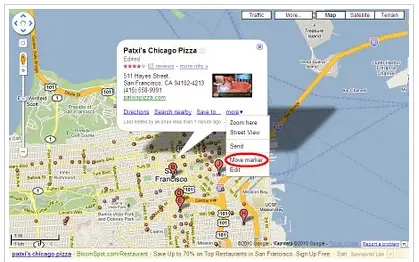
So, in case you find a specifically marked spot on Google Maps which you believe is incorrect you can edit this by clicking on the marker to display the infowindow. Click on the “more” link and then click the “Move marker” link in the drop down menu. Then you can drag the marker to the right spot on Google maps.

Pretty cool, right? So, have you used Google Maps before? Do you find the place markers useful or utterly useless?

Filed Under: Internet, Software, Web Tools Tagged With: google maps, street view

Google Intros Public Data Explorer Tool in Labs

May 7, 2023 by Arnold Zafra

Not so long ago, Google started experimenting on public data search feature that lets users find useful statistics while searching for information. This has been expanded later on to include World Bank statistics including population and demographics data on a global scale. Now, Google is expanding this service by launching the Google Public Data Explorer.

Google Public Data Explorer is an experimental visualization tool that is being released under Google Labs. It lets you easily explore, visualize and communicate large datasets through animated charts and maps. What’s good about the Public Data Explorer is the fact that it makes all these happen easily and without requiring data expertise to view meaningful and rich statistical data sets. And the datasets updates automatically through time.

Once you’ve mashed-up enough datasets, the Google Public Data Explorer makes it easy for you to share them by embedding it on your website or blog.

Now here’s the exciting part. Once you’ve embedded a statistical graph on your website or blog, your users can click on a play button and watch the graphs changes in real-time.

Google Public Data Explorer currently culls data sets from various sources such as the World Bank, U.S. Bureau of Labor Statistics and the U.S. Census Bureau, OECD, U.S. Bureau of Economic Analysis, California Department of Education, Eurostat and more.

Google Public Data Explorer is a pretty useful tool if you’re working in development projects or research. It’s your alternative to the costly proprietary statistical databases being offered by commercial vendors.

You may want to check out the Google Public Data Explorer and see if you can make use of it.

Filed Under: Internet, Web Tools Tagged With: google public data explorer, statistical datasets

Delicious is Alive, Goes to Chrome as an Extension

May 7, 2023 by Arnold Zafra

Delicious, the social bookmarking site  has been pretty quiet for the past couple of months.  While the site is still alive and kicking nothing much has been heard from it for a long time now. No news, no updates and no new features, until now. And guess what’s keeping the Delicious folks busy? A Delicious Extension that sits right on your Google Chrome’s toolbar.

Yes folks, you read it right, Delicious a Yahoo property just got a new iteration as a Chrome extension.  Don’t get me wrong here, there’s nothing utterly incorrect about this. It’s just don’t I don’ t really expect Delicious to make its presence felt anew by way of Google Chrome extension.

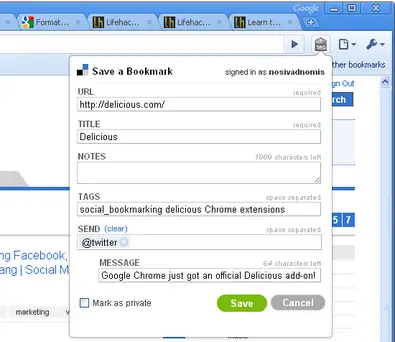
Anyway, what does this early beta of  Delicious Chrome Extension has to offer? Pretty much actually. It lets you sync your Delicious bookmarks, get all your bookmarks right on the Chrome Omnibar,  bookmark a current page in just a click of the Delicious button and search your bookmarks right on the current Chrome tab you are viewing.

The Delicious Chrome Extension works pretty much the same way as other Chrome Extensions. But to guide you in using it properly, the Delicious team has prepared this guided tour.

And to install the Delicious Chrome Extension, just click this link. After installing you just need to register your Delicious account and you’re all set to go.

Filed Under: Internet, Web 2.0, Web Tools Tagged With: chrome extension, delicious, google chrome

Google Turns Email Notifications for Wave

May 6, 2023 by Arnold Zafra

I know for a fact that Google Buzz and Google Wave are two different services. But we can’t discount the fact that their functions are almost similar.  So let me ask you this question, since Google Buzz was released, are you still using Google Wave? If yes, then you’d be glad to know that Google has just activated email notification for Google Wave.

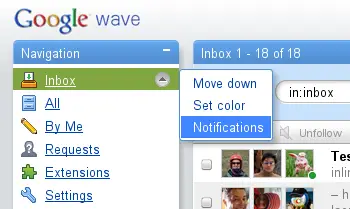
Google Wave’s notification works just like all the other Google notification systems – Buzz, Email Alerts for specific search results and others. It sends you email alerts whenever a wave that you are participating in gets an update or whenever a new Wave has been created by your Google Wave contacts. The notification contains a short summary of text and links that will lead you straight to the updated waves. Once you’ve checked out a wave, Google will stop sending the notifications related to that wave.

The feature also lets you select the frequency of email updates that will be sent to you. It could be as often as “immediately,” and you can select which of your friends you will like to receive notifications from, whenever they create a new wave or update an existing one.

Now, should you decide to use this feature, expect to encounter the following known issues so far, which Google is currently resolving. But don’t let this stop you from trying out the new Google Wave notification feature.

  • Sometimes the email snippet does not show all participants on the wave
  • Under certain conditions you may get an update about a wave even if you were the last person to change it
  • To change the notifications setting you have to go back to the menu where you turned it on. (The link at the bottom of the notification emails is not working yet.)

Filed Under: Internet, Web 2.0, Web Tools Tagged With: email notification, google wave

It’s Gowalla Vs. FourSquare, Which Side are You On?

May 5, 2023 by Arnold Zafra

Undoubtedly, location-based or location aware services, be it on the web or mobile is the next big thing to watch out for. And if you haven’t jumped into the bandwagon, you might want to check out Gowalla or FourSquare, two of the hottest location-based social networking tool which are fighting it over the right to become the market’s number 1 service.

And these two services just might officially spark up their unavoidable rivalry at the upcoming SXSWi 2010 gig next week. Both FourSquare and Gowalla are said to be bringing more innovative features in the said event.

So, which side are you on? Are you using Gowalla or FourSquare? Have you checked what new features each of them are preparing to unveil?

I actually have both, and several of them. I have FourSquare on my iPhone and BlackBerry Bold while Gowalla both sits on my iPhone and Google Nexus One phone. But I don’t get to use them that much since there are very few people in my area who uses these applications.

In terms of features, Gowalla recently revamped its Passport pages by using Big icons to show places you’ve visited. It is also now easier to spot if you’ve got new friend requests. Design-wise, Gowalla has also made some improvements, specifically eliminating the prevalent dark green hues of its interface and replacing it with a light green look. Overall, Gowalla is ahead of its competitor, FourSquare in the looks department.

If FourSquare is lacking on the looks department, it is however prepping up some functionality enhancement. One of these is the “categories” element to plaes. This new feature simply lets you put places you’ve visited into various categories to make browsing easier.

Of course, these two location-aware services would only thrive if you are using them. So, which side are you taking? Have you used either of the two on your mobile devices?

Filed Under: Mobile, Social Networks, Web Tools Tagged With: foursquare, gowalla, location-aware

10.5 Million Blogs Go Real-Time with Pubsubhubbub

May 5, 2023 by Arnold Zafra

All WordPress.com hosted blogs just beaten others in becoming a really real-time online content property. Thanks to Pubsubhubbub or PuSh as what some people have shortened it to, each and every posts you published on your WordPress.com blog will now be pushed automatically, in real time to the web. This means, real-time feed push to RSS aggregators such as Google Reader, Bloglines, Friendfeed, Netvibes and others.

Basically, what PuSH does is to let your feed aggregators  to register automatically to receive updates from your blogs each time you publish new posts. These updates are sent out within a second or two after you publish a content. Previously, the process is a bit tedious since your blog is periodically being asked by these aggregators if there are any updates before notifying those who are using the service.

The service was automatically activated  for all WordPress.com blogs, so there’s nothing that you need to do to get it going. If you’re blog is not hosted on WordPress.com, you can still have this feature by installing a new plugin which you can download from  here.

And if you want some more information about PubSubHubBub, you can may want to check out project site or the Google groups. If you don’t have any idea what PubSubHubbub is – TheNextWeb describes it as:

An open protocol for distributed Publish/subscribe communication on the internet. The main purpose is to provide near-instant notifications of change updates, which would improve on the typical situation where a client periodically polls the feed server at some arbitrary interval.

Filed Under: Internet, Web 2.0, Web Tools Tagged With: pubsubhubbub, real time, wordpress.com

  • « Go to Previous Page
  • Page 1
  • Page 2
  • Page 3
  • Page 4
  • Page 5
  • Page 6
  • Interim pages omitted …
  • Page 16
  • Go to Next Page »

Primary Sidebar

Privacy Policy

Copyright © 2025 · News Pro On Genesis Framework · WordPress · Log in