• Skip to primary navigation
  • Skip to main content
  • Skip to primary sidebar
  • Internet
    • Browsers
    • Cloud Computing
    • Online Video
    • Search Engines
    • Web 2.0
  • Mobile
    • Android Apps
    • Apps
  • Software
  • Funny Stuff
  • Social Networks
  • Web Tools

Daily Bits

  • Home
  • About
  • Archives
  • Contact
  • Advertise

Is Your Privacy Online Protected?

June 10, 2023 by noemi

Practically everyone is online these days, and you can’t really keep track of all the information on you out there.  While you may be careful with what you post and what you do on the Internet, threats to privacy are very much real.  We’ve heard of horror stories about these issues all too often, but for those who haven’t experienced any problems, the threat may not seem that urgent. If you think this way, it is about time that you take a look at how protected you are.

Judging by the number of articles and posts on online privacy you can find, one should really take this issue seriously.  Here are a few ways by which you can make sure that your online privacy is protected.

Be smart with passwords

This is such a basic thing, but the need for solid passwords cannot be emphasized enough. Remember the simple rules: don’t use one password for all your accounts. Don’t use your name, your birth date, etc. If necessary, keep a file of all your passwords so you won’t have to worry about forgetting them.

Do not “engage” spammers in anyway

That means you automatically click SPAM. Do not bother to reply. Do not even click on the link that says “Unsubscribe” or something similar. Just click SPAM.

Don’t forget to log out

We used to own an Internet cafe many years ago, and I cannot count the instances wherein I would use a computer only to see that the previous user did not log out of Yahoo. You may say that you don’t use public computers, but it still is a good habit to develop.

For more tips and details, visit my sources for this post: The Telegraph and EFF.

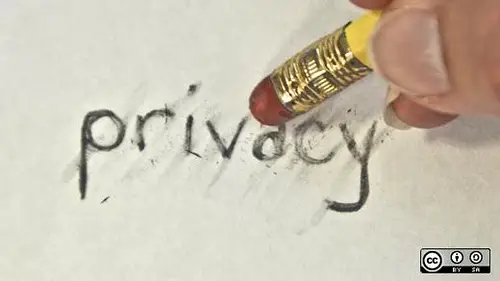
Photo credit: opensourceway
Filed Under: Internet, Security Tagged With: Internet, online privacy tips, Security

Facebook Places: Let Everyone Know Where You Are

June 10, 2023 by noemi

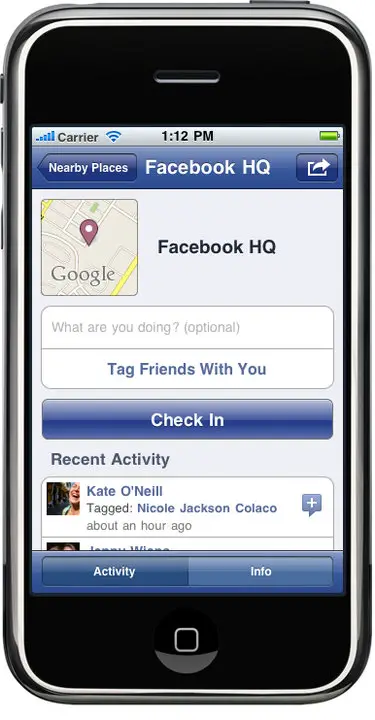
Why would you want that? Well, I am sure that it can come in handy sometimes, but whatever I think about the idea, the fact is that Facebook has just launched a new feature for US users: Facebook Places. The application is available on the iPhone and allows Facebook users to share their locations. If you are thinking of Foursquare, you’re right on.

In the Facebook Blog, you can read the official announcement for Facebook Places:

Ever gone to a show, only to find out afterward that your friends were there too? With Places, you can discover moments when you and your friends are at the same place at the same time.

You have the option to share your location by “checking in” to that place and letting friends know where you are. You can easily see if any of your friends have also chosen to check in nearby.

I don’t know about you but that second paragraph just doesn’t cut it for me. Anyhow, with the app, you can choose your settings so that your location will be published. You can also tag your friends who are in the same location as you are. More so, you can see other friends who might have “checked in” in the same area.

This brings to mind what happened to Adam Savage and his geolocation boo-boo. With Facebook’s privacy issues, do we really want to use Facebook Places? You tell me!

Photo credit: Facebook Blog

Filed Under: Social Networks Tagged With: facebook, Facebook Places, geotagging, iPhone apps, Social Networks

Happy 15th Birthday, Internet Explorer!

June 10, 2023 by noemi

You probably haven’t used Internet Explorer in ages – I hardly know anyone who does anymore – but it is still worth noting that this week marks the 15th anniversary of this web browser. If you’ve been going on the Internet for a decade or so, you probably have had your own experiences with Internet Explorer. After all, in the old days, we didn’t have much of a choice. All that changed with the entry of other, more efficient browsers. Still, it’s nice to take a look back and see what the browser has gone through.

A quick rundown on the origins of Internet Explorer…

The first version was released in 1995, August 16. Soon after, in April of 1996, the second version was born. Less than a year – in August of 1996 – IE 3 was released. This was a huge improvement over the first two versions in that it was more integrated with other applications and developers were able to use Cascading Style Style.

IE 4 came in the next year, surrounded by controversy. At this point, Microsoft’s propensity for monopoly was already becoming well known, and their web browser was no exception. Some of you might remember the issue of IE being the sole browser used for Windows, which the courts declared to be unfair. (As an aside: thank God we have other browsers at our disposal now.)

The numbers (IE#) went up with each version and now, in 2010, we are looking at Internet Explorer 9. It is slated to be released on the 15th of September. Supposed to be on the cutting edge of technology, IE 9 is proof of this browser’s tenacity. Despite having a lot of competition in the recent years, it seems that it still has a solid foothold.

Never mind that I haven’t used this browser since forever – Happy Birthday anyway, IE!

Filed Under: Browsers, Internet Tagged With: Internet browsers, Internet Explorer, microsoft

Shortest Hollywood Marriages Top Ten

June 9, 2023 by franky

The team of Infographiclabs created an infographic of the shortest Hollywood marriages for our sister site Celebrific.

Shortest Hollywood Marriages infographic

Filed Under: Funny Stuff Tagged With: Celebrific, Fun, Glamour, Hollywood, Infographiclabs, Infographics, Splashpress Media

MobileASL – Sign Language On Mobile Phones

June 9, 2023 by noemi

What do you use your mobile phone for? If this question were asked 10 to 15 years ago, the most common answer would probably be “for voice calls.” Today, text messaging and browsing the web just might be the “winning answers.”

I bet, though, that communicating using sign language over the phone is not going to be in anyone’s list of anyone’s answers. If a group of engineers from the University of Washington is successful, millions of deaf people around the world will be able to use their mobile phones to make calls; and instead of using voice to communicate, they can use American Sign Language!

The team has dubbed themselves the MobileASL, and they have been working on a technology that compresses video signals. The technology focuses on the face and the hands of the user, optimizing the use of the bandwidth. In addition to that, the engineers are also looking at conserving battery life by detecting whether or not the user is signing. At “idle” moments, the power use can be lowered to extend the battery life.

At this point, the brains behind the technology still want to know more about how it will perform in real life situations. They have conducted studies with “real” users, and the response has been positive so far. The edge that MobileASL has is the fact that they are aiming to make the technology available over a broad range of devices. No iPhone-only application from these guys – if they have their way, practically anyone will be able to make use of their creation.

Filed Under: Mobile Tagged With: American Sign Language, mobile phones, sign language, video calling

Is Your Geotag Function Disabled?

June 9, 2023 by noemi

Tech-savvy individuals would know all about geotags. Initially, the whole idea can make you overly excited. When you hear about what happened to Adam Savage (of Mythbusters fame), though, you might think twice about enabling thing function.

Basically, geotagging allows data to be embedded in different media such as photos and videos. For example, when you use your iPhone to take a picture, the longitude and latitude can be included in the file. When uploaded to a web site, anyone who views the file can extract that data.

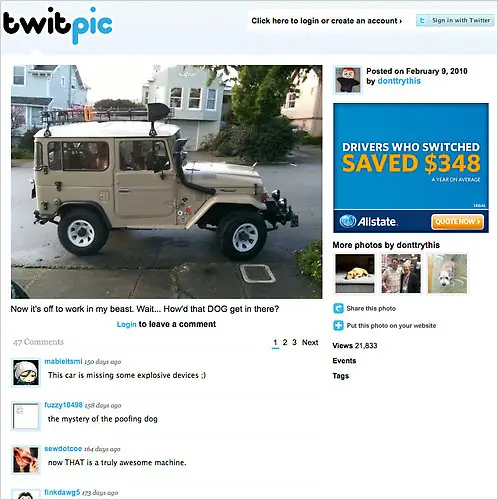
That’s what happened to Adam Savage, who posted a photo of his ride to work on Twitter. As a caption, he wrote “Now it’s off to work in my beast. Wait…How’d that DOG get in there?”

Nothing’s wrong with that, right? Think again. The photo included details on the exact location of his home (where it was taken). His caption also revealed the information that the house might be empty in the next several hours. You see where I am going with this?

You’d think that someone like Adam Savage would have known better than to do something like this, but he salvaged the situation quite well by saying that he was not at all concerned about the issue as he is not famous enough to be stalked. Now I am not so sure about that…Oh, and yeah, he moved to another house.

Anyhow, even if you are not a public figure like Adam Savage, you might want to disable that geotag function. After all, you know how ingenious unscrupulous individuals can get.

Photo from The New York Times

Filed Under: Internet, Media, Security Tagged With: Adam Savage, geotags, Mythbusters, Twitter

  • « Go to Previous Page
  • Page 1
  • Interim pages omitted …
  • Page 45
  • Page 46
  • Page 47
  • Page 48
  • Page 49
  • Interim pages omitted …
  • Page 285
  • Go to Next Page »

Primary Sidebar

Privacy Policy

Copyright © 2025 · News Pro On Genesis Framework · WordPress · Log in