• Skip to primary navigation
  • Skip to main content
  • Skip to primary sidebar
  • Internet
    • Browsers
    • Cloud Computing
    • Online Video
    • Search Engines
    • Web 2.0
  • Mobile
    • Android Apps
    • Apps
  • Software
  • Funny Stuff
  • Social Networks
  • Web Tools

Daily Bits

  • Home
  • About
  • Archives
  • Contact
  • Advertise

General

FontPark: Get Your Fill of Fonts

June 14, 2023 by noemi

Tired of using the same old font forever? There are some people who tend to stick with the same old font for years.  However, it is always a good thing to shake things up a bit every now and then.  This is especially true if the font you have been using forever does not match the new theme that you are planning to implement in your blog.  More so, if your favorite font is not really user friendly, you really have no choice but to use something else that will help your reader.

Now that’s only one group. There are people who just can’t get enough of fonts!  Designers, of course, need to have a wide array of fonts at their disposal.  And, even if you’re not a designer, you can never really have enough fonts to play with anyway.


If you belong to the second group, here’s something that just might make you feel like a little kid in a candy store: FontPark.  This web site has more than 70,000 fonts that you can use.  Yes, that’s 70,000 fonts that anyone can download and use. The best part? All 70,000++ fonts are free to download and use.  Whether you are going to use the fonts for personal or commercial purposes, you don’t have to pay!

There are actually a lot of other sites from which you can download fonts.  Of course, some of the best sites will charge you to download their fonts.  In most of these web sites, you will be able to find fonts for free as well, but for the most part, you will have to pay for the nicer fonts.  I suppose that’s the biggest advantage of FontPark.

It is easy enough to navigate, like many other font sites.  You can browse the collection alphabetically or by category.  Alternatively, you can do a search of your own.  Oh, and the fonts are not all letters – you can find all sorts of interesting characters as well.  You can preview each font so that you can see exactly what it looks like.  More so, the fonts can be used for PC, Max, and Linux.

I know now where I am going to go if I need to change my routine a bit!

Filed Under: General Tagged With: fonts, free downloads, free fonts, websites

Priority Inbox Tips Straight from Google

June 14, 2023 by noemi

Have you used your Priority Inbox yet?  I shall write this post under the assumption that you activated the new Gmail feature the moment you saw that red notification in the upper right corner of your browser.  (I know I did!)

A little over a week since the Priority Inbox was launched, it seems to me that it is not generating a lot of excitement.  I jumped right into the water by activating the feature, and I am still using it.  Yeah, I guess my Inbox does look more manageable now, but somehow, I feel as if I were missing something.  Maybe I am. Maybe you are, too.

Well, the Google team shared five tips to make the most of the Priority Inbox in the Gmail Blog yesterday.  Let’s take a quick look – maybe these tips will fan the flames of enthusiasm again.

  1. Customize your sections. Did you know that you can further tweak the sections so that you will see exactly what you want to see in your Inbox?  You can add sections, indicate labels that you want to be shown, and even control the number of messages to be shown for each section.
  2. Train the system. Truth be told, I have been spending too much time on doing this.  I know I can train the system as I go along, but it’s just a lot of fun going through months’ worth of e-mails and labeling each as important or not.
  3. See the best of your filtered messages.  Okay, this one totally escaped me the first time.  Anyhow, you can override filters so that messages deemed important (but with filters) will still be shown in your Priority Inbox.
  4. Use filters to guarantee certain messages get marked important (or not). More on filters? If ALL the e-mails your boss sends you are important, then simply create a filter that will cause all e-mails from your boss’s address to be marked as important.
  5. Archive unimportant messages quickly.  Too many e-mails in the “Everything Else” section? Just click on the drop down menu and archive shown messages in one fell swoop.

So tell me, do you find any of these tips helpful?

Filed Under: General, Internet Tagged With: e-mail, gmail, google, Priority Inbox

Happy 2nd Birthday, Google Chrome!

June 13, 2023 by noemi

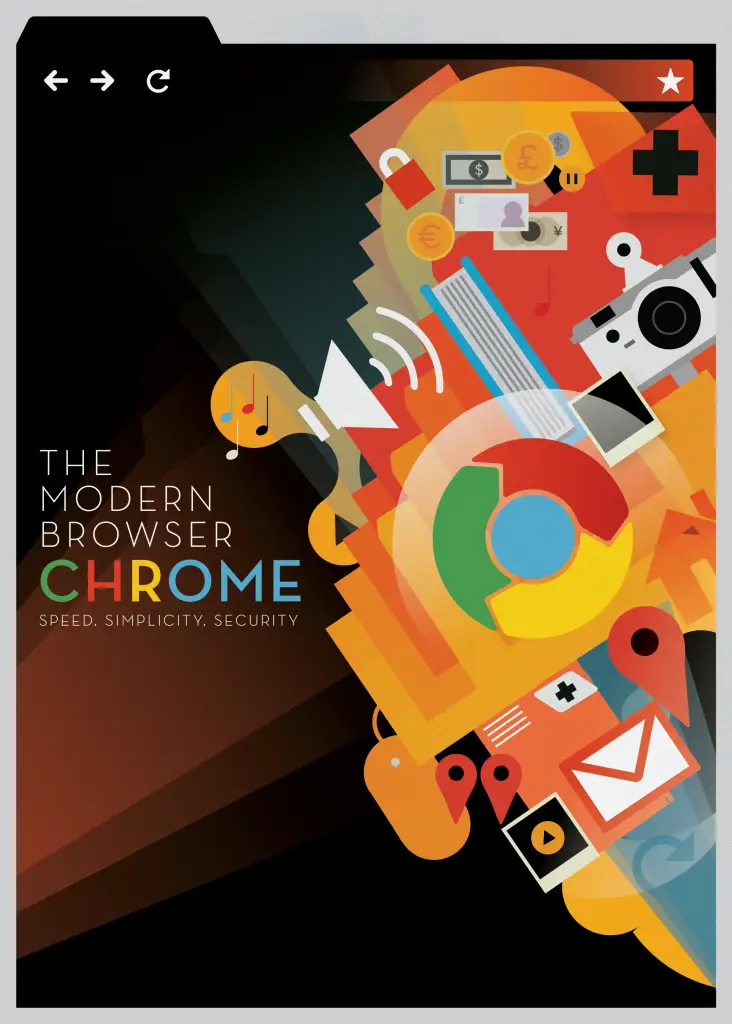
Time does fly, doesn’t it?  Not that we spend our days counting just how “old” web browsers are, but one cannot help but notice the hoopla surrounding Google’s celebration of the second anniversary of Google Chrome.  I cannot remember the exact date that I heard about Chrome, but I clearly remember my excitement.  Two years later, I have to say that Chrome has lived up to my expectations. (Although I have to admit that I still use Firefox more.  Chrome is always ready, though, in case Firefox crashes.)

So anyway, if you happened to check the Google Chrome Blog yesterday, you’d know all about the new stuff they’ve done to Google Chrome – manifested in the latest version.  The new version is much faster and even more streamlined.  You thought that Chrome was the simplest of all browsers out there?  Think again!  The guys at Google worked extra hard to make this new Chrome simpler than ever!

Some of the changes are:

  • Two menus have been combined into one.
  • Buttons have been moved.
  • The URL box and Omnibox have been cleaned up.
  • JavaScript performance is three times faster than it was two years ago.

Well, I’ll stop rattling on about it – why don’t you download the newest Google Chrome (2nd birthday edition, if you will) yourself?

By the way, that image up there is by Mike Lemanski and was used in the official announcement in the Google Chrome Blog.  Isn’t it awesome?

Filed Under: General Tagged With: google chrome, Internet, web browsers

i3Space: Touchable 3D

June 11, 2023 by noemi

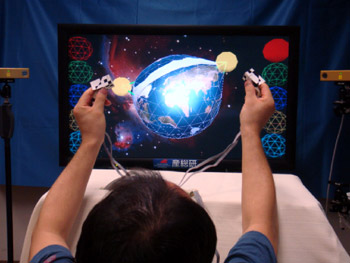
Who is not into 3D? Movies – and even TV series – are jumping into the 3D bandwagon, and people are only clamoring for more. Now, we have something to make us even more excited about the 3D realm. Leave it to Japanese inventors to call dibs on “touchable” 3D technology!

Japan’s National Institute of Advanced Industrial Science and Technology (AIST) just announced this new technology that they have been working on. Dubbed i3Space, this will allow people to experience 3D on their television sets in a way they have never done so before.

How does it work?

You will need a device that you have to attach to your fingertips. This device will give the person using it a sensory experience – both tactile and kinesthetic – as if he/she were touching the 3D image in real life. Talk about a “real” virtual experience (yeah, that oxymoron, I know). The technology makes use of multiple cameras, ensuring that there are no blind spots.

For now, we do not have all the details about the system, but news is that the Institute will be sharing more information on i3Space later on this month at the CEDEC 2010. This event is going to be held from August 31 to September 2, 2010 at Yokohama City, Japan. In case you’re wondering, the CEDEC is a conference for game developers.

That caught your attention, didn’t it? Yes – just imagine how awesome your gaming experience will be if i3Space were supported by your favorite gaming platform? The system is in its very early stages, but if things go according to plan, we should have something in the near future.

Photo credit: Tech-On

Filed Under: General, Media Tagged With: 3D, i3Space, Japanese technology

The Internet’s Carbon Footprint Will Make You Think Twice

June 9, 2023 by noemi

If you are concerned for the environment, then this post just might make you think twice about spending so much time on your computer and on the Internet. According to The Guardian, the carbon footprint of the Internet is astounding: 300 million tones of carbon dioxide per year. Just to make that more understandable:

• Almost as much as all the coal, gas, and oil burned in Turkey or Poland
• More than half of the fossil fuels that the UK burns
• Imagine every person in the UK flying to the US and back – twice.

Astounding is the word, right? It makes you think – all the effort you’ve been putting into making the world a better place might be going down the drain. All because you spend so much time on the Internet. (Yeah, I am talking about myself here.)

Then again, the Internet does help cut back on energy consumption in so many ways. The same article outlines a couple of points:

• Smart grids are possible because of the Internet, and we all know they save energy.
• Tools such as video conferencing software help cut back on flights (read: higher carbon footprint).

More interesting are the ideas that Leo Hickman posted about a year ago. In his article, he posed the suggestion of cutting back on Internet usage:

Might we now have to ration our use of the internet to ensure its very survival? If so, what would be considering a fair share of the internet? Thirty minutes of browsing a day per person? Fifty megs of download a day? Just as we are being asked to “do our bit” for the environment by flying less, using public transport more, eating less meat and the like, might we now be asked to download fewer bulging multimedia files?

Call me biased and totally subjective, but just how accurate are these figures anyway? Isn’t it possible that the situation isn’t that bad? But yes, this post is making me think twice.

Photo credit: Green Office Projects

Filed Under: General, Internet Tagged With: carbon footprint, energy usage, environment, Internet

Will Ferrell and Wired Tie Up

June 7, 2023 by noemi

The Apple iPad is one of the most sought after gadgets today – and no wonder. While it is small enough to be portable, it delivers only the most excellent graphics. That is why countless content providers have jumped into the fray, developing content for specifically for the iPad.

Wired.com is one such provider, but it seems that it has been having difficulty attracting enough subscribers for its iPad application. One factor is that a lot of the content offered in the paid version is also available in the web site for free.

Now, the provider is scrambling to get paid subscribers. As part of its efforts, Wired.com has created exclusive videos that can only be viewed via the iPad application. More so, it has employed the help of comedian Will Ferrell. While not everyone thinks Will Ferrell is funny (for the record, I think he is hilarious), this collaboration should serve to make the Wired iPad app more marketable.

Here’s a sampling of what is on offer.

Wired – Will Ferrell Short from Nick Bilton on Vimeo.

This is only the beginning for Wired.com’s expansion, though. In the near future, various content will be available for other gadgets such as the iPhone, tablet computers, Android phones, and the like. More so, by fall of this year, Wired.com is also planning on including social networking and sharing features.

Wired.com does provide interesting content, and the move to join forces with Will Ferrell just might be a good thing for them. Will this entice you to pay $5 for the app, though?

Filed Under: General, Mobile Tagged With: apple ipad, iPad aplications, videos, Will Ferrell, Wired.com

  • « Go to Previous Page
  • Page 1
  • Interim pages omitted …
  • Page 19
  • Page 20
  • Page 21
  • Page 22
  • Page 23
  • Interim pages omitted …
  • Page 116
  • Go to Next Page »

Primary Sidebar

Privacy Policy

Copyright © 2025 · News Pro On Genesis Framework · WordPress · Log in