• Skip to primary navigation
  • Skip to main content
  • Skip to primary sidebar
  • Internet
    • Browsers
    • Cloud Computing
    • Online Video
    • Search Engines
    • Web 2.0
  • Mobile
    • Android Apps
    • Apps
  • Software
  • Funny Stuff
  • Social Networks
  • Web Tools

Daily Bits

  • Home
  • About
  • Archives
  • Contact
  • Advertise

WordPress.com Now Allows Posting and Reading via Twitter

April 17, 2023 by Arnold Zafra

post-view-m2The folks at WordPress.com are really working doubly hard these days to improve on the services they offer to loyal users of the free WordPress hosting site. After the geotagging and emails subscription features, here’s another better and more useful feature – posting and reading via Twitter API.

The new feature is supposed to work with mobile Twitter applications which use the Twitter API. Of course, it was tested on an iPhone application, particularly Tweetie 2.0. But the feature should work on any third party app that allows you to set a custom API URL.

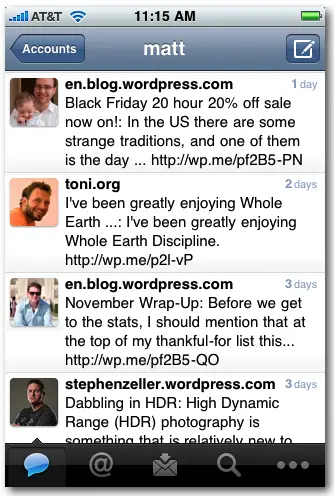
To enable posting and reading to your WordPress.com blog via Tweetie 2.0, you need to add your WordPress account to Tweetie just like you are adding another Twitter account.  To make it work, you need to add https://twitter-api.wordpress.com/ to the API Root field before adding the account. Once your information is verified by Tweetie 2., you can then start posting to your WordPress.com blog using your iPhone’s Tweetie 2. app.

If you’re having problems setting up your account, full details can be found here.

Filed Under: Internet, Web Tools Tagged With: tweetie 2, Twitter, wordpress.com

Playboy Has an App for That Too!

April 17, 2023 by Arnold Zafra

playboyappicon_thumbHold your horses fellas! Before you start grabbing the Playboy iPhone which just got approved, let me tell you as early as now that Apple is not supporting mobile pornography. The Playboy app was approved for resale at the iTunes Store because of the merits of the magazine’s articles. Yeah, right!

And for technology’s sake we are covering the release of Playboy’s iPhone app here in DB. In fact, I’m about to tell you its features. So please read on first before you start installing the Playboy iPhone app.

So, what does this iPhone app has to offer for $1.99? It’s basically a “stripped” down version of Playboy magazine. You’ll get to read most of the magazine’s article columns such as Playboy Interview, Playbor Advisor, 20 Questions, Party Jokes, Fashion and more.

And most importantly Playboy iPhone app also got the magazine’s bread and butter – Playmate of the Month but the Playmates are not going to be in their full nude poses. Bleh! You didn’t really expect Apple to go lax with their Anti-Nudity policy, right? So, what you will see as part of the Playmate of the Month feature are the playmates’ bios, data sheet, preview picture and behind the scenes video.

Still interested with this iPhone app even without the nudity aspect? I’m sure you’re still are.  Now is the time to get the Playboy iPhone App. Have Fun folksies!

Via Krapps

Filed Under: Internet, Mobile Tagged With: playboy iphone app

Five Popular Google Chrome Extensions Worth Installing

April 17, 2023 by Arnold Zafra

When Google announced recently that Google Chrome is now available for the Mac, Google Chrome Extensions in Chrome Beta was also made available. In case you’re not using Google Chrome, Extensions are just your Plugins and Add-Ons for Firefox.

There are currently around 300 Extensions available right now which can be found here. But you don’t have to go through all these extensions to find what are going to be useful to you. Here are 5 popular Google Chrome Extensions that you should install in case you are using Google Chrome Beta. Procedures for installing Extensions on Google Chrome Beta follows our list. So be sure to check it out. [Read more…] about Five Popular Google Chrome Extensions Worth Installing

Filed Under: Internet, Web Tools Tagged With: Chrome Extensions

Facebook Wants You to Go Public

April 17, 2023 by Arnold Zafra

With all the rage on real-time search right now, it is not surprising that Facebook would want its members to rethink their privacy settings. Interestingly, Facebook issued this long press release explaining all sorts of things where in fact it could easily just ask users – “hey folks! we’re getting into the real-time bandwagon, care to share your Facebook profile so that we would have something to offer to the search engines?”

That would have saved them the trouble of writing the long piece, justifying and sugar coating the real objective of persuading Facebook members to go public.

Ok, I may be too harsh. Let’s give the Facebook folks the benefit of the doubt and consider the announcement as a genuine call for Facebook members to personalize their privacy settings and look at the easy-to-use tools that will help empower them to adjust these settings.

Let’s see now, individual privacy settings for individual posts and content, deletion of the regional network settings, transition tool for reviewing and updating members’ privacy settings, and a learning center that aims to educate members about the importance of personalizing their privacy settings on Facebook.

Alright folks, the ball is now in your hands. Are you going public with your Facebook account or not?

Filed Under: Internet, Social Networks Tagged With: facebook

Offline Gmail Graduates from Labs

April 16, 2023 by Arnold Zafra

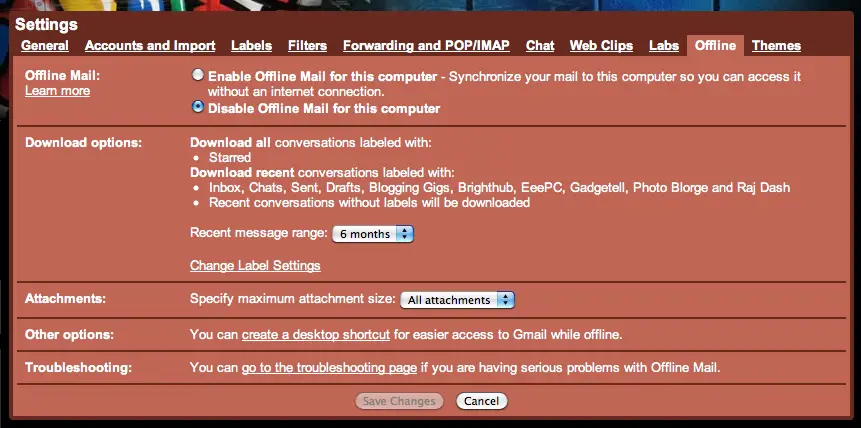
Screen shot 2009-12-09 at 5.23.19 AM

For those of you who have been trying out the many experimental features in Gmail Labs, you’ve probably activated Offline Gmail browsing before. Well, one year has already passed and it’s now time for Google to take this feature out of the Labs and release it as an official feature of Gmail.

Offline Gmail is a very useful feature especially for those who regularly experience slow Internet speed (like us here in Manila). By activating the feature, you’ll be able to use the normal Gmail interface for reading and writing email, searching and organizing even if your computer is offline. Offline Gmail also has an added feature called Flaky connection, which speeds up Gmail if your connection is slow or unreliable.

As an added feature of Offline Gmail, you can now select which messages from your Gmail Inbox that you want to be downloaded as well as send attachments even when your computer is offline.

If you’ve activated this feature before, you’re all set to use offline Gmail. But if you haven’t done so, you may tweak your Gmail settings and activate the Offline feature.

Filed Under: Internet Tagged With: gmail, offline

Apple Reminisces with iTunes Rewind 2009

April 16, 2023 by Arnold Zafra

Screen shot 2009-12-09 at 4.59.52 AM‘Twas a successful year for one of Apple’s bread and butter – the iTunes store. And to reminisce on what has happened this year, here comes an early treat from Apple – iTunes Rewind 2009.

iTunes Rewind 2009 lists down the bestselling iTunes content – be it apps, music, movies, podcasts and other mobile content available at the iTunes store. Music and movies are ranked according to sales and downloads, while apps are categorized into games and apps.

So, if you’ve been an avid iTunes user the whole year, iTunes Rewind 2009 is definitely a list worth checking out for you.

On with the list – best games of 2009 at the iTunes Store include the likes of Spider, Real Racing, Zenonia and Ravensworld, while top selling games of 2009 include SIMS 3, Oregon Trail, Need for Speed Undercover, and Madden NFL 10. The last two games are definitely a must have for every iPhone gamer.

For Best Apps of 2009, Reel Director, Magellan Roadmate and I Am T-Pain are some of who made it into the list, while top selling apps include the likes of Mobile Navigator America, MLB.com and Textfree Unlimited.

Boom Boom Pow by Black Eyed Peas is the top selling single for 2009 at the iTunes Music Store while Michael Jackson of course was the Artist of the Year. Album of the Year goes out to Kings of Leon’s “Only by the Night.”

Top selling movies at the iTunes Store for 2009 include the likes of “Twilight”, “Star Trek” and “Up”.

Check out iTunes Rewind 2009 here.

Filed Under: Internet, Mobile Tagged With: 2009, apple, Best of iTunes, itunes, iTunes Rewind 2009, review

  • « Go to Previous Page
  • Page 1
  • Interim pages omitted …
  • Page 81
  • Page 82
  • Page 83
  • Page 84
  • Page 85
  • Interim pages omitted …
  • Page 285
  • Go to Next Page »

Primary Sidebar

Privacy Policy

Copyright © 2025 · News Pro On Genesis Framework · WordPress · Log in