• Skip to primary navigation
  • Skip to main content
  • Skip to primary sidebar
  • Internet
    • Browsers
    • Cloud Computing
    • Online Video
    • Search Engines
    • Web 2.0
  • Mobile
    • Android Apps
    • Apps
  • Software
  • Funny Stuff
  • Social Networks
  • Web Tools

Daily Bits

  • Home
  • About
  • Archives
  • Contact
  • Advertise

Automattic Launches VaultPress, Back Up Service for Self-Hosted Blogs

May 14, 2023 by Arnold Zafra

Automattic has announced its new service that is aim to help self-hosted WordPress blog owners ensure that their blog properties are safe and secure. The new service called VaultPress is an online backup service built on the Automattic grid which in case you’re not aware is serving more than 10 billion WordPress.com blogs and 250 million monthly visitors.

VaultPress would ensure that your blogs and sites are completely secure no matter what happens to the server where it is hosted.  The service will secure your plugins, themes, comments, posts revisions  and of course every bit of content of your WordPress blogs.

Despite the complexity of what it can do, using VaultPress will be surprisingly easy. It’s actually your usual WordPress plugin that you can install on your blogs.  And you can always add additional blogs easily anytime you need to.

And once you get VaultPress running, it will continously monitors and stores updates to your blogs and sites. Everything that you do – write, edit, and upload will be simultaneously reflected in your VaultPress backup.

Sounds wonderful, right? Unfortunately, VaultPress will be offered as a Premium service.  Monthly fee is expected to be around $10.  But hey, it’s not really a big sum of money considering that it will safely secure that your blogs will always be online.

VaultPress is about to go on close beta state. If you want to be part of the beta testers, you may sign up here.

Will you register your blog on VaultPress once it goes public? Are you willing to pay for it?

Filed Under: Internet, Security, Web Tools Tagged With: automattic, vaultpress, wordpress

MySpace Hosts Casting Calls for Glee

May 14, 2023 by Arnold Zafra


Glee Open Casting Call Video with Matthew Morrison

Glee Auditions | MySpace Video

I’m not really a fan of the hit musical Glee, but if you are and you’ve dreamt of becoming part of the cast of this show, you might be interested to know that auditions for the next season of Glee has just started.

And guess what? You don’t have to go all the way  to the Fox studio to audition. You can show the producers and casting crew of  Glee that you’ve got the talent to make it to the next cast of Glee  via the MySpace Glee audition site. Yes, MySpace? You still remember that social networking site, do you?

If  you are up for the challenge, here’s how you can audition for the next season of Glee:

  • If you’re an amateur or professional performer between the ages of 16 and 26, submit an audition video at www.myspace.com/gleeauditions, explaining why you want to be on “GLEE” and demonstrating your stellar singing ability to the sounds of one of 10 “GLEE” hits via MySpace Karaoke. You can also opt to upload your own pre-recorded video.
  • Audition videos must be limited to five minutes in length (intro one minute and song up to 4 minutes) and one submission per person.
  • Whether auditioning or not, viewers can share videos, post comments and rate favorites with gold stars in real-time.
  • Visit the official “GLEE” Auditions MySpace page for more information, song list and additional rules.

Want me to enumerate the list of songs that you can use for your audition? Well, you probably know that more than I do. If you’ve made it this part of the article means that you’re a big fan and you’re interested with this gig. So, have fun!

Filed Under: Internet, Media, Online Video, Social Networks Tagged With: glee casting calls, glee musical

LinkedIn Releases Mobile App for BlackBerry Devices

May 14, 2023 by Arnold Zafra

LinkedIn expands it services further with the release of  its new mobile applications for all BlackBerry  devices including Tour, Curve and Bold models running OS v4.3 or later. The new LinkedIn for BlackBerry is a handy application that will be most useful for looking up professionals worldwide, in real-time.

The LinkedIn for BlackBerry gives you a full, rich feature set designed to bring the most useful features of LinkedIn to your BlackBerry devices. It has six modules:

  • Network Updates – for viewing and sharing crucial business intelligence and updates.
  • Search – for searching across 60 million global professionals, and get the answer back in seconds through a  unified search across both your direct connections and the entire LinkedIn network.
  • Connections – for getting  quick access to any of your connections to get their up-to-date profile information, and the ability to send them a message immediately.
  • Invitations – for accepting outstanding invitations immediately.
  • Messages – for integrated access to BBM and LinkedIn messages.
  • Reconnect – for bringing suggestions for new connections.

Of course, it’s major purpose is for quickly viewing LinkedIn profiles right on your BlackBerry devices, anytime, anywhere.  In the business setting, you can get an upper hand during board meetings  if you know some personal details about the people you will be negotiating with, prior to the meeting proper.

LinkedIn for BlackBerry is available now as a free download here. It will soon be available in the BlackBerryApp World as well.

Filed Under: Mobile, Social Networks Tagged With: BlackBerry app, linkedin for blackberry

Yahoo Now Lets You Update Facebook Status Inside Yahoo Mail

May 14, 2023 by Arnold Zafra

Yahoo continues its drive towards becoming more social with another integration feature in cooperation with Facebook.  To be rolled out gradually to users, Yahoo is now allowing you to update your Facebook status while you are reading your Yahoo mail. You can also see your friends’ Facebook profile photos when they send you an email.

This is a follow-up to the previously rolled feature which allows Yahoo users to import their Facebook friends’ email addresses to Yahoo! Contacts. The new feature also solidifies some more Yahoo and Facebook’s underlying partnership. Of course,  Gmail also somehow has this feature wherein you can respond to updates via email, but this feature is not as fluid as the Yahoo Mail-Facebook integration.

The new feature is to be rolled out to select users initially. If you’re one of them, you’d find the activation link if you see the “Add to Facebook” option in the status section on the What’s New page in your Yahoo Mail account.

Once you’ve logged on with your Facebook credentials and successfully connected to Yahoo Mail, you can start using the following features:

Update your Facebook Status: Simply start typing what’s on your mind in the status box, and then choose where you want to share it – Yahoo!, Facebook or both.

See Facebook profile photos when people email you: With this feature, you will see people’s Facebook profile photos – if available – anytime someone emails you.  In addition, by clicking on the profile image, you will go right to that person’s Facebook page.

Filed Under: Internet, Social Networks Tagged With: facebook integration, yahoo mail

Google Rolls Out File Transfer Feature on Orkut and iGoogle, Coming Soon for Gmail Too

May 13, 2023 by Arnold Zafra

Google is rolling out a new  feature to some of its communication services such as Orkut, iGoogle and Gmail. This new feature has something to do with easily transferring files through the chat facility.

If you are an Orkut member or you use iGoogle as a start up page for your browser, you might be aware that both these services have a Google-powered chat facility.  And one of the important feature of  any chat facility is of course file transfer capability.

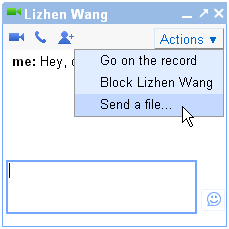
So, if you want to transfer file to a friend, you don’t have to send them an email again. Just start a chat session, click on the “Send a file” option from the Actions menu and then start sending the file.

And while you’re either in your Orkut dashboard or iGoogle account, you may have noticed that Google also did some minor facelift to on the chat facility of these two services. More particularly you may have noticed three new blue icons that enable you to start a video, voice or  group chat easily and quickly.

These new chat features will also be available to Gmail Chat facility . But in the meantime, you can still use the “Video and More” option from the Gmail chat window to start a video conference with your Gmail buddies.

Filed Under: Internet, Web Tools Tagged With: chat, file transfer, igoogle, orkut

Facebook Takes a New Step in Site Governance

May 13, 2023 by Arnold Zafra

Recently, Facebook has published some updates to its statement of site governance. These updates aim to maintain users’ control over privacy and the things they share on Facebook. Here’s a quick look at the salient features of the proposed changes to Facebook’s Site Governance Page.

On Location – Facebook might soon introduce a new feature that will let you add a place to something you post. By place, Facebook means a page for a local restaurant instead of the actual geotag of its location. More details and other privacy controls about this feature will be rolled out in the coming days.

On Sharing and Connections – Facebook is also clarifying on how members connect with people, places and things that are important and how this information and content are shared with friends and other people. Right now, Facebook members share photos or links on their profile and can control who can access those. Facebook will change some wording to further clarify these policy.

On Applications and Third-Party Websites – Facebook will soon be proposing a new privacy policy that would offer more personalzied experience when visiting and sharing third-party websites that are featured on Facebook.

Other Policy Changes – Facebook is also explaining the series of smaller changes on different aspects of Facebook including why invitations that a non-user receives to join Facebook sometimes include the names of other people besides the person who invited them, as well as a thorough explanation of the “Everyone” setting. The new policy changes also explain how people can sync their contact lists on mobile devices and other contact management services.

Here’s the link to the proposal: Facebook Site Governance policy.

Filed Under: Internet, Social Networks Tagged With: facebook, facebook privacy control, facebook site governance, Privacy, social network

  • « Go to Previous Page
  • Page 1
  • Interim pages omitted …
  • Page 63
  • Page 64
  • Page 65
  • Page 66
  • Page 67
  • Interim pages omitted …
  • Page 285
  • Go to Next Page »

Primary Sidebar

Privacy Policy

Copyright © 2025 · News Pro On Genesis Framework · WordPress · Log in