• Skip to primary navigation
  • Skip to main content
  • Skip to primary sidebar
  • Internet
    • Browsers
    • Cloud Computing
    • Online Video
    • Search Engines
    • Web 2.0
  • Mobile
    • Android Apps
    • Apps
  • Software
  • Funny Stuff
  • Social Networks
  • Web Tools

Daily Bits

  • Home
  • About
  • Archives
  • Contact
  • Advertise

Web Tools

Online Image Editor Aviary Joins the Free App Crowd

May 2, 2023 by Arnold Zafra

I first learned about Aviary a couple of months ago, back then  I could only try out some of its features and wished that its other advanced features were free that time. A couple of months after, here’s Aviary finally setting its powerful suite of browser-based design tools free for anyone to use.

To set things straight this early, Aviary is not just online image editor. Like I said it’s a suite of web applications made specifically for creative people who want to create stuff and do more with their photos and creations.

Three key features of Aviary which has been added since it is now a free online app include:

  • saving private files
  • automatic addition of watermark
  • access to all the tutorials on how to effectively use Aviary’s suite of creation tools

If you’ve used Aviary before and actually  signed up for a paid  subscription in the alst 30 days, here’s a good news – Aviary will refund your payments.

As a creation tool, Aviary offers you six editing tools represented by various bird species. These include:

Phonenix – the main image editing tools such as layers, masks, effects, undo history and more.

Peacock – Aviary’s visual laboratory or the effects editing tools.

Raven – the vector editor.

Falcon – the image markup tool which you can use to capture images and web pages from your browser or desktop and crop, resize or mark them up.

Myna – audio editor which you can use to remix music tracks and audio clips as well as for applying sound effects and record your own voice or instruments.

Toucan – Aviary’s color palette that you can use in conjunction with other creation tools. It also lets you inject color into your creation.

Ready to exercise your creative talents? Check out the free Aviary tools now.

Filed Under: Internet, Web Tools Tagged With: aviary, image editor, online apps

Amazon to Give Free Kindle to Amazon Prime Subscribers?

April 30, 2023 by Arnold Zafra

Are you a frequent Amazon products buyer? Do you do all of your online shopping via Amazon? If you do, you must be an Amazon Prime subscriber already. Well, guess what? Amazon is reportedly planning to give out free Amazon Kindles to their loyal Amazon Prime Subscribers. Last time I checked, I’m an Amazon Prime subscriber, so Amazon please push through with your plans. I would love to get that free Kindle.

In case you’re not aware, Amazon Prime is a premium subscription product that entitles members to a free two days shipping on any of their purchases at Amazon. Members are charged an annual fee of $79/year to maintain this privilege. They are also considered as Amazon’s best customers who makes multiple purchases every month.

Amazon’s plan of giving out free Kindles was first reported by TechCrunch. According to Arrington, what’s keeping Amazon from pushing this play as of now is that the Amazon folks are still figuring out how to do it without losing too much money. Amazon of course is in dire need of getting the Kindle into the hands of as many people as they can, especially with various threats coming from its rivals, and upcoming rivals such as the iPad. And giving it out for free to those who will potentially purchase e-books from the Kindle store could be a pretty good strategy.

So, there. If you’re an Amazon Prime subscriber, hope that this plan pushes through.

Filed Under: Internet, Web Tools Tagged With: amazon kindle, amazon prime

In Case You Missed It, You Can Also Create a Buzz on Google Reader

April 29, 2023 by Arnold Zafra

So, have you started “buzzing around?” Has Google enabled Google Buzz on your Gmail? Or have you tried it on your mobile phone?  How was it? Revolutionary? Innovative?  Well, in case you might have missed it due to the influx of buzz that Google has created with the launch of Google Buzz, the service is actually also available in Google Reader. That is you can also post the items from your Google Reader as a buzz on your Gmail.

To activate this feature, all you need to do is to link up your Google Reader account to Gmail Buzz. And while you’re there, you might also want to link up other current services that are tied up with your Google Profile.  Once set up, everything that you share on Google Reader will be automatically be posted to your Gmail Buzz. That’s why Google Buzz is called a social sharing service.  Once your Reader item is posted as a buzz, people who are following you will be able to post comments to the items you shared.

The good thing about this, in case you didn’t notice it, is that the people you follow and who follow you on Google Reader are also the same set of people in your Gmail Buzz.

This is why I like Google Buzz so far. It’s like partaking of a new product without exerting to much effort on learning something new. Something which Google Wave did, and which is gradually leading it to its downfall.

Got one more room for a person to follow? Follow me on Twitter, I mean on Google Buzz – http://www.google.com/profiles/noli725.

Filed Under: Internet, Social Networks, Web Tools Tagged With: buzz in google reader, google buzz

Facebook Makes Uploading Photos Easier, Faster

April 28, 2023 by Arnold Zafra

Facebook is rolling out some new feature enhancements today as it celebrates its 6 year anniversary.  Some of you might have already seen the new Facebook UI wherein the top site  navigation and left menu were changed a bit. Part of these enhancements is Facebook’s photo uploading facility which will enable you to share and upload photos to your Facebook account easier and faster.

According to the Facebook blog, the photo uploader will be gradually rolled out in the coming weeks.  While we all wait for this to be activated on our Facebook accounts, here’s what we all should expect to see and experience.

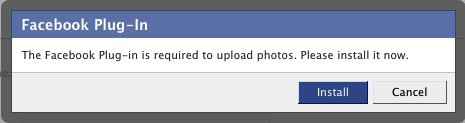
First, the photo uploader will now be a Facebook plugin. Meaning once it is activated on your account, you will be prompted to install that plugin. Once installed and as you try to upload photos, the uploader will display a photo browser which you can use to select the photos you want to upload from your desktop.

So what’s so exciting about it? Well, aside from uploading your photos faster, you can now navigate away from the upload page and check out other parts of your Facebook profile or if you want you can navigate away from Facebook completely while the upload process is still ongoing.  Once the upload process is completed, you will be prompted by the plugin which will allow you to go back to the photo uploader to edit, tag and add captions to your photos.

Sounds exciting? If you upload many photos on your Facebook account, the new photo uploader is definitely heaven sent. Can’t wait to try it out.

Filed Under: Social Networks, Web Tools Tagged With: facebook photos, photo uploader

Pages Creation Feature Graduates from Blogger in Draft

April 27, 2023 by Arnold Zafra

Since I stopped using Google’s free blog hosting platform, Blogger a long time ago, that doesn’t mean that I also stopped monitoring what’s been happening with the service. So, not so long ago Blogger introduced this feature for creating static pages and put it in their  “Blogger in Draft” beta feature testing site. Guess what? After a long time, that feature has finally graduated from beta and  is now an official Blogger  feature.

If you’re still running a blog hosted on Blogger.com and you’ve  missed this feature, now is the best time to try it out. Basically, what this allows you to do is to create static Pages that you can link to on your Blogger main page. You can create up to 10 static pages which can be for About page, your Biographical details, information about what you are blogging about and many other related information.

The process of creating a page is similar to the way you create a blog post. Once you’ve created a page, you can have it published on your main blog page using the Pages widget. If you’ve created several pages, you can even organize how these will be displayed on your blog’s main page.

This feature works well for blogs that use any of the default blog templates. For those who are using customized template on the Blogger blogs, the process of creating pages and organizing them is a little different and requires some knowledge of HTML and coding. You can check out the procedures for adding Pages tab on blogs with customized template from here.

You know what this mean? Those who want to create an online presence for themselves or for their businesses but do not want to start a blog, can now use Blogger.com to create their websites. And they don’t have to spend anything since the service is free.

Filed Under: Internet, Web Tools Tagged With: blogger, blogspot

Google Chrome 4 Supports Greasemonkey Scripts

April 26, 2023 by Arnold Zafra

If you’ve been using Google Chrome 4 as your web browser, you’ve probably installed several extensions right after it was launched recently. But if you feel like that currently available Google Chrome extensions is not enough, how’s 40,000 more extensions sound to you?

Yes, believe it or not there are around 40,000 new extensions which you can install/activate on your Chrome 4. Well, thanks to Greasemonkey user scripts which has just been supported by Chrome. If you’ve been using Firefox before, you’d know that these scripts lets you customize web pages through simple Javascripts

Actually the 40,000 extensions are basically the converted user scripts available on Greasemonkey before. And with Greasemonkey enabled, you can practically use these user scripts on your Chrome browser after it is converted into Chrome Extension.

Installing these  scripts is just like installing or activating the usual Chrome extensions. That means the process can be done easily.

Of course there’s caveat emptor here. These scripts are very powerful and even has full access to your data, so be cautious of what scripts your are going to activate. In addition, some Greasemonkey may not work with Google Chrome 4 just yet.

So there. To make Google Chrome 4 more fun and useful either you check out the extensions gallery or get more Greasemonkey scripts.

Filed Under: Internet, Web Tools Tagged With: Chrome Extensions, google chrome, greasemonkey

  • « Go to Previous Page
  • Page 1
  • Interim pages omitted …
  • Page 3
  • Page 4
  • Page 5
  • Page 6
  • Page 7
  • Interim pages omitted …
  • Page 16
  • Go to Next Page »

Primary Sidebar

Privacy Policy

Copyright © 2025 · News Pro On Genesis Framework · WordPress · Log in