• Skip to primary navigation
  • Skip to main content
  • Skip to primary sidebar
  • Internet
    • Browsers
    • Cloud Computing
    • Online Video
    • Search Engines
    • Web 2.0
  • Mobile
    • Android Apps
    • Apps
  • Software
  • Funny Stuff
  • Social Networks
  • Web Tools

Daily Bits

  • Home
  • About
  • Archives
  • Contact
  • Advertise

Social Networks

Social Network BeautifulPeople.com Kicks Out Members Who Gained Weight

April 20, 2023 by Arnold Zafra

Screen shot 2010-01-04 at 9.14.16 PM

If you’re a social networking site hailed as the sexiest website in the world, you’d certainly go leaps and bounds to protect your reputation, right? But would it be to the extent of kicking out your members because they’ve gained weight?

Believe it or not, that’s what the social networking site BeautifulPeople.com did to around 5,000 of its members who posted their photos showing that they’ve gained weight.

According to a BBC report BeautifulPeople.com founder Robert Hintze said that although they mourn the loss of any member, they can’t do anything about it since the site has to uphold is high standard of beauty. So, it only goes to show that for the site, being fat is being ugly. Ouch! that kind of hurts, right?

“Letting fatties roam the site is a direct threat to our business model and the very concept for which BeautifulPeople.com was founded,” said Mr. Hintze.

Surprisingly, the move was initiated by the site’s other members, tasked to monitor the site for members who may be violating their high standard of being attractive.

BeautifulPeople.com accepts new members only upon being voted by other members as “sufficiently attractive.”

Curious as to how beautiful the site’s members are, I checked out BeautifulPeople.com but had to leave quickly before I got tempted to check it out as a guest. Saved myself from being branded as too ugly, lucky me!

Screen shot 2010-01-04 at 9.13.12 PM

Filed Under: Social Networks Tagged With: BeautifulPeople.com

Facebook Had a Better Christmas than Google

April 20, 2023 by Arnold Zafra

For the first time in its history, Facebook has become the most visited website in the United States on Christmas Eve and Christmas Day. According to Experian Hitwise via a Twitter post, Facebook which was number two most visited website on the same day last year has dislodged Google which was now at the no. 2 spot.

Of course this is not surprising since Facebook users have probably used the site to communicate with their family and friends through the site, exchanging Holiday greetings and sharing photos of their celebration. And this might seem that email has become a thing of the past during this time of the year.

Interestingly, all through out 2009, Facebook has been running third behind Google and Yahoo! Mail despite being the most popular search query from all major search engines, as noted by Hitwise.

That’s worth noting. HitWise reported last year that Facebook was number two behind Google on Christmas. People say that Facebook vs. Google will be the Web’s biggest battle in coming years – but it looks like Facebook has already won the battle for Christmas.

Another interesting point to mention is the fact that the surge of site visits on Facebook happened amidst controversial privacy issues hurled at Facebook this year. Either users no longer mind these issues or they just couldn’t find a better and faster way to communicate with their friends and family during the Holiday Season.

With 2010 just a few days away, it would be interesting to see whether Facebook can sustain this trend and how Google will possibly react.

Filed Under: Internet, Social Networks Tagged With: facebook

LinkedIn iPhone App Updated to Look More Like Facebook

April 20, 2023 by Arnold Zafra

linkedin-iphone-home

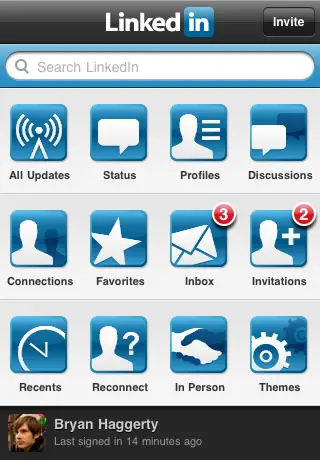
LinkedIn couldn’t wait until the new year before launching new features of its iPhone app. So, before we all bid 2009 goodbye, here are some new features and enhancements of the LinkedIn iPhone app.

First thing you’ll notice of course is the new home screen interface with the most common and important features of the LinkedIn app on top of the home screen – All Updates, Status, Profiles and Discussions. These options are arranged in a 4 by 3 square similar to the layout of Facebook app’s main screen.

Next improvement is a completely revamped search interface that display search results faster than you can imagine. Likewise, the profile screens were also improved with summary of details about the LinkedIn member, review of their education and experience, list of people you both know in common and the ability to mark that person as a favorite. This Favorite feature would be most useful if you want a quick look on some of the most important people you’ve searched on LinkedIn.

And then the LinkedIn app also makes it easier to check updates  through four new modules – all updates, status udpates, profile updates and discussions. The app even allows you to filter updates based on your favorited connections. You can make comments on the updates as well.

Other new features of the LinkedIn iPhone app include – more powerful inbox and Address Book Integration and a cool feature that lets you find and connect with LinkedIn members real-time in person through Bluetooth. Provided of course that the LinkedIn member is using the iPhone app also.

Alright folks, here’s the LinkedIn iPhone app download link.

Filed Under: Social Networks Tagged With: iPhone app, linkedin

Facebook Preps Up Help Center for 2010’s Surge in Userbase

April 20, 2023 by Arnold Zafra

Screen shot 2009-12-29 at 8.16.30 AM

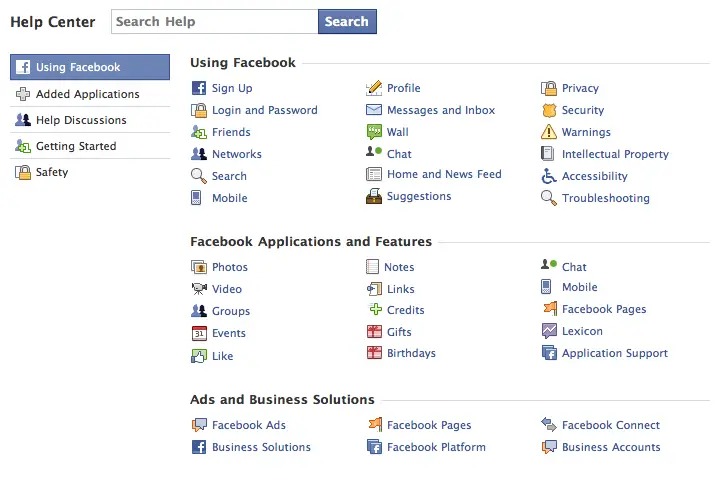
As early as now, Facebook is already gearing up for possibly a surge in membership base come 2010.  And first from Facebook’s list of feature improvement is something that we may have never checked at all in our entire Facebook life – the Facebook Help Center.

Yes dear readers, there is such a thing. If you’re aware of this Facebook section, let me ask, when was the last time you’ve read it? Or did you read it at all before you begin your Facebook life?

If you haven’t check it out before, now is probably the best time to do so, as Facebook recently made some changes to the Help Center to make it more – helpful especially for Facebook newbies.

Some of these improvements include, a new search interface, navigation filters on the left side, separate user-to-user support, new privacy and safety pages, separate user-to-user support navigation and unique web addresses or URLs.

The Facebook Help Center is loaded with useful information about making your lives better, easier and more fun as you become part of the Facebook community. So, there’ s no harm in actually visiting it from time to time.  What? You don’t know how to access it? Just hover your mouse cursor on the Settings tab and select “Help” from the pull-down options. Better yet, just click on this link to visit the Facebook Help Center.

Filed Under: Social Networks, Web 2.0 Tagged With: facebook, Help Center

FarmVille, FML, Swine Flu Top Facebook’s Status Updates in 2009

April 19, 2023 by Arnold Zafra

Following the tradition of year-end list, Facebook released its Memology: Top  which according to the Facebook blog is a study of how “memes” or new ideas and trends spread on Facebook, through member’s status updates and wall postings. Facebook mapped the top trending words and phrases in the U.S. Facebook members to come up with this 2009 list.

If you’ve been following similar annual trend list released by other websites including Google, Twitter and YouTube where the top trends are mostly entertainment and global affairs related, the top trends on Facebook clings more on personal topics. This is of course understandable since Facebook networks are more personalized.

Here’s Facebook’s explanation on how they came up with the list:

To generate the list, we started by looking at how many times each phrase with length from one-to-four words occurred in U.S. Facebook status updates, then we computed the rate at which each phrase occurred in 2009 compared to 2008. Using some data-mining methods detailed here, we analyzed important bursts in activity around words and series of words to find the key trends for the year. All personally identifiable information was removed from the status updates to conduct this analysis, and no one at Facebook read the individual status updates.

So, here goes Facebook’s Top 5 Status Trends of 2009:

1. Facebook Applications – specific words: Farmville, Farm Town, Social Living

2. FML – specific words: F_ _ k My Life

3. Swine Flu – specific words – Flu, Swine Flu, H1N1

4. Celebrity Deaths – specific words: Michael Jackson, Patrick Swayze, Billy Mays

5. Family – specific words: family, mom, dad, son, daughter, kids

Filed Under: Internet, Social Networks Tagged With: facebook memology

Kiwi Joins the Desktop Twitter Client Craze

April 19, 2023 by Arnold Zafra

Tired of your current Twitter desktop client? Maybe because it doesn’t let you style the main client interface? Well, here’s another entrant to the gradually getting crowded Twitter desktop client market – Kiwi.

Screen shot 2009-12-20 at 7.34.04 PM

Kiwi is a Twitter desktop client for Mac OS X that among

other things lets you use various colorful themes.  Kiwi’s standard features include:

  • supports multiple accounts
  • supports account combinations
  • supports various rules
  • multiple account grouping
  • mentions, hashtags and links
  • notifications
  • tweet badges

Kiwi supports Mac OS X 10.6, Snow Leopard and Webkit. So if your Mac supports all of these, you can use Kiwi as your Twitter desktop client. You can try downloading a free “incomplete” copy which allows you to do pretty much some of the good stuff that you can do with other Twitter desktop client.

But if you feel like you need more features, you can also get the paid software which will cost you $15.

I’m currently checking out Kiwi and so far so good. The theme selection and theme API is definitely Kiwi’s stongest point. Other features are practically the same as other Twitter desktop client.

So, if you don’t mind buying a desktop client to do all your Twitter chores, you might want to consider getting Kiwi.

I’m going to test it some more and see if it is good enough to make me spend my precious $15.

Via

Filed Under: Social Networks, Software, Web Tools

  • « Go to Previous Page
  • Page 1
  • Interim pages omitted …
  • Page 13
  • Page 14
  • Page 15
  • Page 16
  • Page 17
  • Interim pages omitted …
  • Page 29
  • Go to Next Page »

Primary Sidebar

Privacy Policy

Copyright © 2025 · News Pro On Genesis Framework · WordPress · Log in