• Skip to primary navigation
  • Skip to main content
  • Skip to primary sidebar
  • Internet
    • Browsers
    • Cloud Computing
    • Online Video
    • Search Engines
    • Web 2.0
  • Mobile
    • Android Apps
    • Apps
  • Software
  • Funny Stuff
  • Social Networks
  • Web Tools

Daily Bits

  • Home
  • About
  • Archives
  • Contact
  • Advertise

Social Networks

Facebook Makes Uploading Photos Easier, Faster

April 28, 2023 by Arnold Zafra

Facebook is rolling out some new feature enhancements today as it celebrates its 6 year anniversary.  Some of you might have already seen the new Facebook UI wherein the top site  navigation and left menu were changed a bit. Part of these enhancements is Facebook’s photo uploading facility which will enable you to share and upload photos to your Facebook account easier and faster.

According to the Facebook blog, the photo uploader will be gradually rolled out in the coming weeks.  While we all wait for this to be activated on our Facebook accounts, here’s what we all should expect to see and experience.

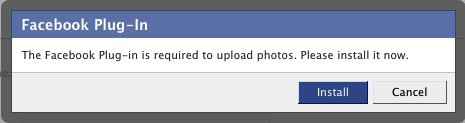
First, the photo uploader will now be a Facebook plugin. Meaning once it is activated on your account, you will be prompted to install that plugin. Once installed and as you try to upload photos, the uploader will display a photo browser which you can use to select the photos you want to upload from your desktop.

So what’s so exciting about it? Well, aside from uploading your photos faster, you can now navigate away from the upload page and check out other parts of your Facebook profile or if you want you can navigate away from Facebook completely while the upload process is still ongoing.  Once the upload process is completed, you will be prompted by the plugin which will allow you to go back to the photo uploader to edit, tag and add captions to your photos.

Sounds exciting? If you upload many photos on your Facebook account, the new photo uploader is definitely heaven sent. Can’t wait to try it out.

Filed Under: Social Networks, Web Tools Tagged With: facebook photos, photo uploader

Twitter Asked Some Users to Reset their Passwords

April 26, 2023 by Arnold Zafra

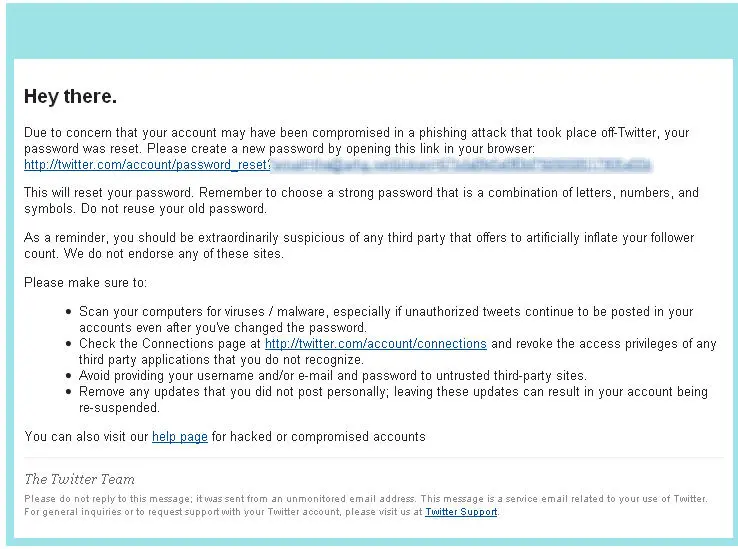
Right after we posted about Sophos study on the security risk posed by social networks, here comes a buzz regarding some Twitter users getting email from Twitter asking them to reset their passwords.  Thankfully, I’ve not received such email so I’m assuming that my Twitter account is safe, as of the moment.

But for those who received the Twitter email, you should heed Twitter’s call and change your password immediately. Although Twitter has not officially released a statement about it, Digital Inspiration inquired about the issue and received a reply from Twitter that says:

As part of Twitter’s ongoing security efforts, we reset passwords for a small number of accounts that we believe may have been compromised offsite. In one case, a number of accounts posted updates indicative of giving their username and password to untrusted third parties. While we’re still investigating and ensuring that the appropriate parties are notified, we do believe that the steps we’ve taken should ensure user safety. We’ll continue provide updates as warranted at @safety and @spam. We do, as always, encourage our users to read our help pages on what to do if your account is compromised: http://twitter.zendesk.com/forums/10713/entries/31796 and how to stay safe on Twitter: http://twitter.zendesk.com/forums/10711/entries/76036.

So, there you go folks. That confirms that news of this new Twitter attack. If you didn’t get the email, there’s a slight chance that your account might still be attacked. So the best thing to do is to change you password anyway. I just did. Now, when will this ever stop really?

Filed Under: Social Networks Tagged With: phisers, Twitter

Report, Corporate Security at Risk Due to Attacks on Social Networks

April 26, 2023 by Arnold Zafra

Hope that this news doesn’t get into your company’s IT administrators as I’m pretty sure their first reaction would be to block off your access to social networking sites, if they haven’t done so yet. A new report by IT security and data protection firm Sophos, showed that there is an alarming rise in cybercriminals attacking corporate staff coming from Facebook, Twitter and other social networks.

The Social Security report is part of Sophos’s 2010 Security Threat Report which surveyed more than 500 organizations and explored current and emerging computer security trends.

The report found out that 57% of users report they have been spammed via social networking sites. This is an increase of 70% from last year’s data. As for malware, 36% of users reported that they have received malware via social networking sites. This is 69.78% increase from last year’s data.

The report also revealed 60% of the respondents naming  Facebook as the biggest security risk for the company followed by MySpace, Twitter and LinkedIn. While this is understandable considering that Facebook is the largest social networks in terms of  membership, LinkedIn however could provide the most vital information about corporate individuals since it is more business oriented and information shared by its members can provide a corporate directory which cybercriminals will be more than be happy to exploit.

Another interesting point to note here is that Sophos found out that 49% of the firms surveyed have allowed their staff free access to Facebook. So while companies are loosening their attitude to staff activity on social networks, there goes your friendly malware, spam, phisers and identity theft threatening to spoil the party.

Filed Under: Social Networks

Brightkite Releases Apps for Nokia S60 and Palm Pre Phones

April 26, 2023 by Arnold Zafra

Before Yelp, Gowalla and Foursquare and other location-aware social recommendation/discovery sites became popular on smartphones, there was Brightkite.  It was among the earlier apps of this kind which I’ve tried using on my iPhone.

Today Brightkite just released two new apps for two mobile platforms, Brightkite for Nokia and Parafoil for Palm. The Brightkite app for Nokia runs on all Symbian S60 5th edition phones such as the N97 and Nokia 5800 XpressMusic. It is currently available for download at the Nokia Ovi Store.

Meanwhile, the Palm application is called Parafoil and was built using the Brightkite API.  The app works with Palm Pre and Palm Pixie phones. You can download this third-party app from the Palm App Catalog.

According to Brightkite’s founder Brady Becker:

” The new Nokia and Palm apps allow more people to use Brightkite in the easiest and most rewarding ways.”

By releasing these two apps, Brightkite is extending its reach beyond the U.S. market. since Nokia phones are very popular in the international market. In fact, Japan is one of the many countries which showed strong growth in the usage of Brightkite during  the previous months.

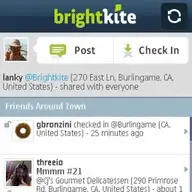
In case you have not used Brightkite before, this app lets you  meet people around you, keep up with your friends, explore and discover new places. On the other hand, Parafoil lets you share your location, send photos, post to Twitter and Facebook all from one place.

You may download Brightkite for Nokia app here, and Parafoil here. The app is also available for the BlackBerry, iPhone and Android devices.

Filed Under: Mobile, Social Networks Tagged With: brightkite, nokia s60, palm

Gowalla Adds Trips and Bookmarking Features to its Fun and Useful App

April 25, 2023 by Arnold Zafra

Location-aware social recommendation sites are so hot today. Recently, I wrote something about AT&T’s plan to release its Buzz service, possibly to go up against Yelp, Foursquare and Gowalla. Yelp and Foursquare has been getting their share of publicity lately, and now here comes Gowalla with some nifty additions to its already interesting services.

If you haven’t used Gowalla either on your iPhone or on the web, the concept is pretty simple. You create an account, add Trips, Gowalla’s term for identifying places you’ve visited including your opinions about those places and share them with other Gowalla users. Whereas before, trips were curated by the Gowalla team, now you can create your own Trips, describe these Trips and add up to 20 spots that you have visited before and then published it for your friends to see via the Gowalla app that they are using.

To make adding Trips more fun, Gowalla will also start featuring unique and exciting trips. These trips will be promoted on the merits of their quality and relevancy and the number of people who completed the trip. Custom pins or badges, which are the stuff that make Gowalla more fun will be given to Gowalla members who have completed trips published trips by other members.

In addition, you can now create bookmarks of spot pages at Gowalla.com. You can then view your bookmarks from your iPhone. This will also be available to other mobile devices soon.

Alright, I know you’d appreciate these features if you’ve used Gowalla, either from the web or on your iPhone. If you haven’t tried it out, now may be the best time to do so. You might find it cool.

Filed Under: Internet, Mobile, Social Networks Tagged With: gowalla

LinkedIn Improves Address Book Browsing

April 25, 2023 by Arnold Zafra

One of my favorite social networking site which I don’t get to use more often,  LinkedIn has just announced that they would soon be rolling out an improved  address book. The new address book interface aims to make  LinkedIn members more productive.

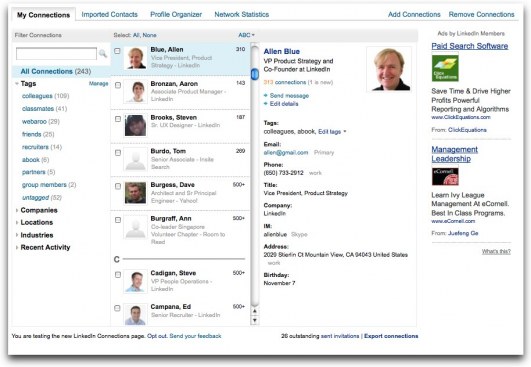
Key feature of the LinkedIn Address Book update is the new browse panel that gives you a facility for viewing your connections based on their current companies, locations and industries. It also lets you search your connections using  first name, last name or current company.  There is also now a Recent Activity filter in the said browse panel that lets you browse your new connections and your connections who may have recently added a new connection.

The LinkedIn mini-profile now lets you view whether your connections have changed their positions, added new connections or even send them a message. You can also look up contact information such as phone numbers, email address and physical mailing address or add these information yourself in your LinkedIn address book.

Other features of the new LinkedIn Address Book include:

  • Connections automatically tagged with keywords such as “colleagues”, “friends”, “partners” and “group members” based on information you provide when inviting them to connect with you
  • Organize your connections into different groups via tags
  • Send a message to multiple connections at once based on how you’ve organized them by tags

Love it so far? Why not pay your LinkedIn profile a visit and see how cool this new Address Book is right now. I just did.

Filed Under: Internet, Social Networks Tagged With: linkedin

  • « Go to Previous Page
  • Page 1
  • Interim pages omitted …
  • Page 11
  • Page 12
  • Page 13
  • Page 14
  • Page 15
  • Interim pages omitted …
  • Page 29
  • Go to Next Page »

Primary Sidebar

Privacy Policy

Copyright © 2025 · News Pro On Genesis Framework · WordPress · Log in