• Skip to primary navigation
  • Skip to main content
  • Skip to primary sidebar
  • Internet
    • Browsers
    • Cloud Computing
    • Online Video
    • Search Engines
    • Web 2.0
  • Mobile
    • Android Apps
    • Apps
  • Software
  • Funny Stuff
  • Social Networks
  • Web Tools

Daily Bits

  • Home
  • About
  • Archives
  • Contact
  • Advertise

Arnold Zafra

Facebook Wants You to Go Public

April 17, 2023 by Arnold Zafra

With all the rage on real-time search right now, it is not surprising that Facebook would want its members to rethink their privacy settings. Interestingly, Facebook issued this long press release explaining all sorts of things where in fact it could easily just ask users – “hey folks! we’re getting into the real-time bandwagon, care to share your Facebook profile so that we would have something to offer to the search engines?”

That would have saved them the trouble of writing the long piece, justifying and sugar coating the real objective of persuading Facebook members to go public.

Ok, I may be too harsh. Let’s give the Facebook folks the benefit of the doubt and consider the announcement as a genuine call for Facebook members to personalize their privacy settings and look at the easy-to-use tools that will help empower them to adjust these settings.

Let’s see now, individual privacy settings for individual posts and content, deletion of the regional network settings, transition tool for reviewing and updating members’ privacy settings, and a learning center that aims to educate members about the importance of personalizing their privacy settings on Facebook.

Alright folks, the ball is now in your hands. Are you going public with your Facebook account or not?

Filed Under: Internet, Social Networks Tagged With: facebook

Offline Gmail Graduates from Labs

April 16, 2023 by Arnold Zafra

Screen shot 2009-12-09 at 5.23.19 AM

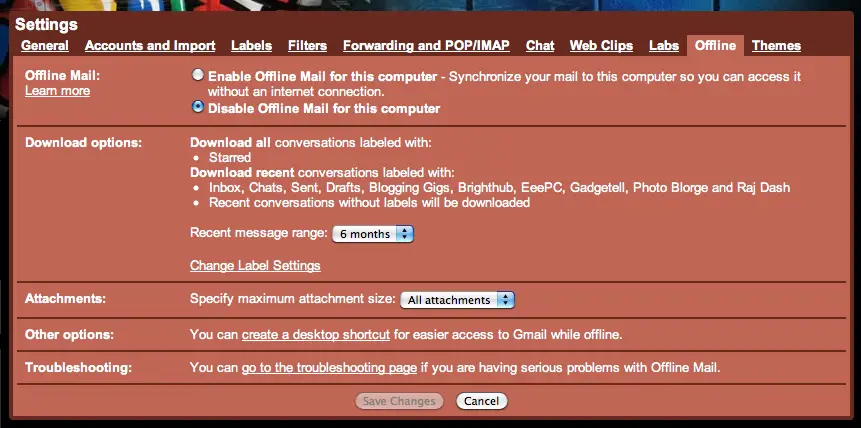
For those of you who have been trying out the many experimental features in Gmail Labs, you’ve probably activated Offline Gmail browsing before. Well, one year has already passed and it’s now time for Google to take this feature out of the Labs and release it as an official feature of Gmail.

Offline Gmail is a very useful feature especially for those who regularly experience slow Internet speed (like us here in Manila). By activating the feature, you’ll be able to use the normal Gmail interface for reading and writing email, searching and organizing even if your computer is offline. Offline Gmail also has an added feature called Flaky connection, which speeds up Gmail if your connection is slow or unreliable.

As an added feature of Offline Gmail, you can now select which messages from your Gmail Inbox that you want to be downloaded as well as send attachments even when your computer is offline.

If you’ve activated this feature before, you’re all set to use offline Gmail. But if you haven’t done so, you may tweak your Gmail settings and activate the Offline feature.

Filed Under: Internet Tagged With: gmail, offline

Apple Reminisces with iTunes Rewind 2009

April 16, 2023 by Arnold Zafra

Screen shot 2009-12-09 at 4.59.52 AM‘Twas a successful year for one of Apple’s bread and butter – the iTunes store. And to reminisce on what has happened this year, here comes an early treat from Apple – iTunes Rewind 2009.

iTunes Rewind 2009 lists down the bestselling iTunes content – be it apps, music, movies, podcasts and other mobile content available at the iTunes store. Music and movies are ranked according to sales and downloads, while apps are categorized into games and apps.

So, if you’ve been an avid iTunes user the whole year, iTunes Rewind 2009 is definitely a list worth checking out for you.

On with the list – best games of 2009 at the iTunes Store include the likes of Spider, Real Racing, Zenonia and Ravensworld, while top selling games of 2009 include SIMS 3, Oregon Trail, Need for Speed Undercover, and Madden NFL 10. The last two games are definitely a must have for every iPhone gamer.

For Best Apps of 2009, Reel Director, Magellan Roadmate and I Am T-Pain are some of who made it into the list, while top selling apps include the likes of Mobile Navigator America, MLB.com and Textfree Unlimited.

Boom Boom Pow by Black Eyed Peas is the top selling single for 2009 at the iTunes Music Store while Michael Jackson of course was the Artist of the Year. Album of the Year goes out to Kings of Leon’s “Only by the Night.”

Top selling movies at the iTunes Store for 2009 include the likes of “Twilight”, “Star Trek” and “Up”.

Check out iTunes Rewind 2009 here.

Filed Under: Internet, Mobile Tagged With: 2009, apple, Best of iTunes, itunes, iTunes Rewind 2009, review

Crunchpad Renamed Joo Joo, Launching this Friday

April 16, 2023 by Arnold Zafra

Screen shot 2009-12-08 at 4.23.11 AM

Nevermind if the name is weirder than the previous Crunchpad. And nevermind if it will no longer be released under TechCrunch Michael Arrington’s tutelage – but the controversial tablet PC, now christened Joo Joo is definitely coming out on Dec 11.

After last week’s announcement by Arrington that Crunchpad was already dead, its manufacturer Fusion Garage finally came out to clear things out and officially announced that they will push they will release the controversial Tablet under the new name – JooJoo.

Fusion Garage promises that JooJoo will get users connected to the Internet in 9 seconds.  How is that possible?  That’s because  Joo Joo will boot directly to the Internet instead of going through the usual OS boot..

Other features of the Joo Joo include Wi-Fi  and full HD video capability as well as  built-in e-book capabilities. The Joo Joo will still have a 12.1-inch touchscreen. Pre-orders will commence on Friday and the Joo Joo is expected to hit the streets at around $499.

The question now, is whether the Joo Joo will be as successful now that it is no longer connected with TechCrunch? Does Fusion Garage have the marketing arm to properly and effectively sell the Joo Joo?

Filed Under: General Tagged With: Crunchpad, Joo Joo

Spread the Joys of Christmas with CardFunk’s Greeting Cards

April 15, 2023 by Arnold Zafra

Screen shot 2009-12-07 at 10.23.27 PM

If you don’t feel like making a fool out of yourselves and other people are using JibJab, you might want to try out CardFunk.com instead. Like JibJab, CardFunk offers several Christmas-related interactive greeting cards which you can try out for free.

Just a brief backgrounder, CardFunk is a site where you can transform yourself into dancing characters by using your own photos. It lets you select different Christmas tunes as a music backdrop, add personal messages and then share your greetings via email, or social networking sites and even on your blogs.

Just in time for Christmas, CardFunk has launched several Christmas-inspired themes – Dancing Christmas Toys, Christmas With the Stars and Wild West Christmas.

Christmas with the Stars spoofs Holywood icons and legends including Elvis, Marilyn and Bob Marley. Dancing Christmas Toys lets you spoof other movie characters including Jack Sparrow, Betty Boop, Wonder Woman and more while Wild West Chistmas lets you create dancing cowboys or cowgirls complete with country music in the background.

Filed Under: Funny Stuff, Web Tools

Twitter’s New Mobile-Optimized Site Might Kill Third-Party Apps

April 15, 2023 by Arnold Zafra

A post at the Twitter blog  has just just revealed a surprising fact – there are still many Twitter users who access their account on their mobile phones using Twitter’s mobile site.  So, to make their experiences more pleasant Twitter has just revamped its mobile browser-optimized site. m2-medlyIt was really surprising that there are still many Twitter users who access their account through the old mobile site despite the fact that there are several third party Twitter apps available. Whether you are using an iPhone, Android phone, Nokia S60 and Palm Web OS phones, you will surely find one or two Twitter apps that you can download for free or for a minimal fee.

Anyway, the new Twitter mobile browser-optimized can be found by pointing your phone’s browser to http://mobile.twitter.com. And one thing I can say about this new site is that it’s an all new look – almost similar to how Twitter apps look and feel like.

Feature-wise the new mobile site offers just about the basic stuff that you can do on Twitter – post tweets, view DMs, Retweet tweets and more. What it won’t allow you to do is to access multiple Twitter accounts at the same time. But if you’re just using one Twitter account, the new mobile site has enough features to please you.

This made wonder whether Twitter is hitting on the third-party apps that have kept the interest of mobile users into using Twitter on their mobile phones? Like I said, the new Twitter mobile site is as good as what you can get from those third-party apps.

So, if you haven’t downloaded any third-party Twitter app, would you be using this new mobile site instead?

Filed Under: Social Networks, Web 2.0 Tagged With: Twitter

  • « Go to Previous Page
  • Page 1
  • Interim pages omitted …
  • Page 24
  • Page 25
  • Page 26
  • Page 27
  • Page 28
  • Interim pages omitted …
  • Page 48
  • Go to Next Page »

Primary Sidebar

Privacy Policy

Copyright © 2025 · News Pro On Genesis Framework · WordPress · Log in