• Skip to primary navigation
  • Skip to main content
  • Skip to primary sidebar
  • Internet
    • Browsers
    • Cloud Computing
    • Online Video
    • Search Engines
    • Web 2.0
  • Mobile
    • Android Apps
    • Apps
  • Software
  • Funny Stuff
  • Social Networks
  • Web Tools

Daily Bits

  • Home
  • About
  • Archives
  • Contact
  • Advertise

Web Tools

Stream Your iTunes Library via SpotifiTunes

April 22, 2023 by Arnold Zafra

Some guys from UK are apparently tired of waiting for Apple to come up with a streaming music service.  They want to have access to their iTunes library even when away from their home computer. And so the solution? SpotifiTunes.

To explain it briefly, SpotifiTunes lets you upload your iTunes database from your PC or Mac to the Spotify website. Then it gives you a summary of your collection categorized in genre, artist and album. You can then select any artist or album and find songs from Spotify and stream it where ever you may be. Of course, you need to have Spotify installed on your computer to use SpotifiTunes.

Not all songs from your iTunes Library may be available in Spotify, although majority of your iTunes music collection might be there.

To use SpotifiTunes, you need to find your iTunes  Music XML file and upload it to this site. You can find your iTunes Music XML file at the following directory on your machine:

Windows: \Documents and Settings\username\My Documents\My Music\iTunes\iTunes Music Library.xml

Mac: /Users/username/Music/iTunes/iTunes Music Library.xml

While this may not be an official Apple service to let iTunes user stream their music online, still, it’s a good work-around while we all await for Apple to release an iTunes streaming music service.  SpotifiTunes is not in any way affiliated with either Spotify or iTunes. This beta tool is currently available only in Sweden, Norway, Finland, UK, France and Spain.


Filed Under: Media, Web Tools Tagged With: spotifiTunes, spotify

Cool Weather App for Star Wars Fans

April 20, 2023 by Arnold Zafra

Screen shot 2009-12-28 at 6.12.16 AM

There are many great weather apps out there but nothing comes close to the coolness factor of Tom Scott’s weather app which was made for Star Wars fan. You see, apart from telling you the weather in a particular place which you enter on the site’s search box, the site also gives you different backgrounds and commentaries mentioning the different locations in the Star Wars universe.

So depending on which city you’re from, you will get weather commentaries such as:

“Oh, 9C Fair. It’s like Naboo out there. Temperate, dry and fairly pleasant.”

“Hmm, 9C, Partly Cloudy?, It’s like Endor out there. Temperate but grey and cloudy”

Well, of course aside from the commentaries, the weather report is actually pretty accurate because the site fetches weather data from Yahoo Weather.

And while you’re at it, you might want to check out Tom Scott’s other creation which includes – Two Drums and Cymbal Fall Off a Cliff, The Corruscant Juggling Club and more. They are pretty cool stuff and makes you think that this guy is really enjoying his work.

Who is Tom Scott? Here’s a short bio:

Tom Scott is a geek comedian. He won the 2008 Kevin Greening Award for Creativity at the Student Radio Awards, once got in trouble with the Cabinet Officefor his version of their Preparing for Emergencies site, and has been described as a”sometime internet funny man” by The Register.

He runs the British part of International Talk Like A Pirate Day, and accidentally got elected as president of his students’ union after running as “Mad Cap’n Tom”.

His work has been shown on BBC One, Channel 4, and at the paraflows net-art exhibition in Vienna.

He also once got five gold runs on ‘Blockbusters’.

So, go check out the the Star Wars Weather app and tell us, how’s the weather out there?

Via Download Squad

Filed Under: Internet, Web Tools Tagged With: star wars, weather app

Kiwi Joins the Desktop Twitter Client Craze

April 19, 2023 by Arnold Zafra

Tired of your current Twitter desktop client? Maybe because it doesn’t let you style the main client interface? Well, here’s another entrant to the gradually getting crowded Twitter desktop client market – Kiwi.

Screen shot 2009-12-20 at 7.34.04 PM

Kiwi is a Twitter desktop client for Mac OS X that among

other things lets you use various colorful themes.  Kiwi’s standard features include:

  • supports multiple accounts
  • supports account combinations
  • supports various rules
  • multiple account grouping
  • mentions, hashtags and links
  • notifications
  • tweet badges

Kiwi supports Mac OS X 10.6, Snow Leopard and Webkit. So if your Mac supports all of these, you can use Kiwi as your Twitter desktop client. You can try downloading a free “incomplete” copy which allows you to do pretty much some of the good stuff that you can do with other Twitter desktop client.

But if you feel like you need more features, you can also get the paid software which will cost you $15.

I’m currently checking out Kiwi and so far so good. The theme selection and theme API is definitely Kiwi’s stongest point. Other features are practically the same as other Twitter desktop client.

So, if you don’t mind buying a desktop client to do all your Twitter chores, you might want to consider getting Kiwi.

I’m going to test it some more and see if it is good enough to make me spend my precious $15.

Via

Filed Under: Social Networks, Software, Web Tools

WordPress.com Now Allows Posting and Reading via Twitter

April 17, 2023 by Arnold Zafra

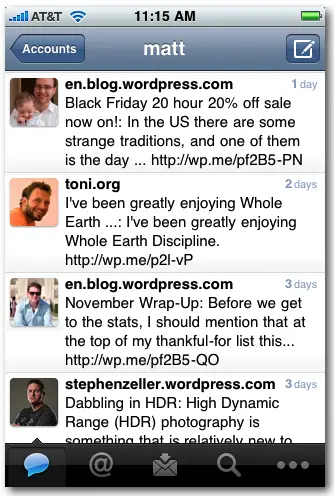
post-view-m2The folks at WordPress.com are really working doubly hard these days to improve on the services they offer to loyal users of the free WordPress hosting site. After the geotagging and emails subscription features, here’s another better and more useful feature – posting and reading via Twitter API.

The new feature is supposed to work with mobile Twitter applications which use the Twitter API. Of course, it was tested on an iPhone application, particularly Tweetie 2.0. But the feature should work on any third party app that allows you to set a custom API URL.

To enable posting and reading to your WordPress.com blog via Tweetie 2.0, you need to add your WordPress account to Tweetie just like you are adding another Twitter account.  To make it work, you need to add https://twitter-api.wordpress.com/ to the API Root field before adding the account. Once your information is verified by Tweetie 2., you can then start posting to your WordPress.com blog using your iPhone’s Tweetie 2. app.

If you’re having problems setting up your account, full details can be found here.

Filed Under: Internet, Web Tools Tagged With: tweetie 2, Twitter, wordpress.com

Five Popular Google Chrome Extensions Worth Installing

April 17, 2023 by Arnold Zafra

When Google announced recently that Google Chrome is now available for the Mac, Google Chrome Extensions in Chrome Beta was also made available. In case you’re not using Google Chrome, Extensions are just your Plugins and Add-Ons for Firefox.

There are currently around 300 Extensions available right now which can be found here. But you don’t have to go through all these extensions to find what are going to be useful to you. Here are 5 popular Google Chrome Extensions that you should install in case you are using Google Chrome Beta. Procedures for installing Extensions on Google Chrome Beta follows our list. So be sure to check it out. [Read more…] about Five Popular Google Chrome Extensions Worth Installing

Filed Under: Internet, Web Tools Tagged With: Chrome Extensions

Spread the Joys of Christmas with CardFunk’s Greeting Cards

April 15, 2023 by Arnold Zafra

Screen shot 2009-12-07 at 10.23.27 PM

If you don’t feel like making a fool out of yourselves and other people are using JibJab, you might want to try out CardFunk.com instead. Like JibJab, CardFunk offers several Christmas-related interactive greeting cards which you can try out for free.

Just a brief backgrounder, CardFunk is a site where you can transform yourself into dancing characters by using your own photos. It lets you select different Christmas tunes as a music backdrop, add personal messages and then share your greetings via email, or social networking sites and even on your blogs.

Just in time for Christmas, CardFunk has launched several Christmas-inspired themes – Dancing Christmas Toys, Christmas With the Stars and Wild West Christmas.

Christmas with the Stars spoofs Holywood icons and legends including Elvis, Marilyn and Bob Marley. Dancing Christmas Toys lets you spoof other movie characters including Jack Sparrow, Betty Boop, Wonder Woman and more while Wild West Chistmas lets you create dancing cowboys or cowgirls complete with country music in the background.

Filed Under: Funny Stuff, Web Tools

  • « Go to Previous Page
  • Page 1
  • Interim pages omitted …
  • Page 4
  • Page 5
  • Page 6
  • Page 7
  • Page 8
  • Interim pages omitted …
  • Page 16
  • Go to Next Page »

Primary Sidebar

Privacy Policy

Copyright © 2025 · News Pro On Genesis Framework · WordPress · Log in