• Skip to primary navigation
  • Skip to main content
  • Skip to primary sidebar
  • Internet
    • Browsers
    • Cloud Computing
    • Online Video
    • Search Engines
    • Web 2.0
  • Mobile
    • Android Apps
    • Apps
  • Software
  • Funny Stuff
  • Social Networks
  • Web Tools

Daily Bits

  • Home
  • About
  • Archives
  • Contact
  • Advertise

Mobile

Gowalla Adds Trips and Bookmarking Features to its Fun and Useful App

April 25, 2023 by Arnold Zafra

Location-aware social recommendation sites are so hot today. Recently, I wrote something about AT&T’s plan to release its Buzz service, possibly to go up against Yelp, Foursquare and Gowalla. Yelp and Foursquare has been getting their share of publicity lately, and now here comes Gowalla with some nifty additions to its already interesting services.

If you haven’t used Gowalla either on your iPhone or on the web, the concept is pretty simple. You create an account, add Trips, Gowalla’s term for identifying places you’ve visited including your opinions about those places and share them with other Gowalla users. Whereas before, trips were curated by the Gowalla team, now you can create your own Trips, describe these Trips and add up to 20 spots that you have visited before and then published it for your friends to see via the Gowalla app that they are using.

To make adding Trips more fun, Gowalla will also start featuring unique and exciting trips. These trips will be promoted on the merits of their quality and relevancy and the number of people who completed the trip. Custom pins or badges, which are the stuff that make Gowalla more fun will be given to Gowalla members who have completed trips published trips by other members.

In addition, you can now create bookmarks of spot pages at Gowalla.com. You can then view your bookmarks from your iPhone. This will also be available to other mobile devices soon.

Alright, I know you’d appreciate these features if you’ve used Gowalla, either from the web or on your iPhone. If you haven’t tried it out, now may be the best time to do so. You might find it cool.


Filed Under: Internet, Mobile, Social Networks Tagged With: gowalla

Apple is Now a $50+ Billion Company, New Product to Boost Income

April 24, 2023 by Arnold Zafra

Apple has just released its first quarter earnings for Fiscal Year 2010 ending on Dec 26, 2009. And guess what? Apple obviously posted significant growth in revenues.  Apple’s total revenue is at $15.68 billion while net quarterly profit is at $3.38 billion or $3.67 per share.

Part of this revenue was due to the sale of the Macintosh computers, accounting for 3.36 million units sold, a 33% unit increase as compared to the same quarter last year.  The iPhone too, managed to contribute to Apple’s overall growth with a 100% increase in unit growth compared to last year.  Apple sold 8.7 million iPhone in the Q1 Fiscal 2010.  The only product line that didn’t earn Apple quite well is the iPod family, representing an 8% decline from last year. Apple probably needs to come up with something new for its iPod products to renew consumer interest.

Of course, the biggest announcement from the earnings report was contained in Apple’s Steve Jobs statement:

“If you annualize our quarterly revenue, it’s surprising that Apple is now a $50+ billion company. The new products we are planning to release this year are very strong, starting this week with a major new product that we’re really excited about.”

Any idea what that product may be? Of course, well all know what that is – it’s the Apple iSlate or Apple Tablet or the Apple iPad. Whatever it is going to be called, I’ve very certain that Apple is coming out with another killer product. Something that everyone would probably want to have.

And we will soon find out about that on the 27th.

Filed Under: Internet, Mobile Tagged With: apple, apple tablet

National Geographic’s iPhone Atlas Uses Bing Maps

April 24, 2023 by Arnold Zafra

In their latest foray into the iPhone apps market, National Geographic is bringing in their version of the World Atlas.  This iPhone app lets you view 7 different levels of cartography, 3 maps styles and a location finder around the world containing 7 million place listings.  In addition, the app also makes use of the Bing Maps platform, embedded right into the heart of the said iPhone application, even serving as a mapping option.

National Geographic claims that its iPhone app utilizes the “highest resolution”  press ready images. Hence giving you the same rich details and graphics quality of the maps it actually has on the printed, published world maps and atlases. In addition, their iPhone app als features a built-in search tool and places directory to help you easily locate even the most remote places eer known to mankind.

Here’s a rundown of the full features of the National Geographic World Atlas for iPhone:

  • High resolution National Geographic cartography, the same used to print our award-winning wall maps and bound atlases!
  • Preloaded with 3 different styles of world maps, down to country detail. Additional detailed zoom levels and Microsoft Bing maps require internet connection to view. Map Library feature allows you to download and save National Geographic maps for faster access and offline use.
  • Easy-to-use and fast place name search tool, with over 6 million database entries (major cities index is preloaded; full search requires internet or cell connection).
  • World Flags and Facts database, expertly edited and up-to-date with concise socio-economic and geographic data.
  • Push pin tool enables you to mark, annotate, and save your favorite places. Push pins come in a variety of colors and can tap into your iPhoto library or camera.
  • GPS enabled iPhones can center the maps to show your current location.

The National Geographic World Atlas for iPhone will cost you $1.99. You may download the iPhone apps from this iTunes Link.

Filed Under: Mobile Tagged With: iPhone app, National Geographic, World Atlas

Whitehouse.gov Goes Mobile with iPhone/iPod App

April 23, 2023 by Arnold Zafra

President Obama’s administration continues to take full advantage of technology in reaching out to millions of Americans who by now are getting into the mobile phone syndrome. The latest of the administration’s foray into technology is by way of an iPhone/iPod Touch app that debuted recently at the iTunes store. The Whitehouse iPhone App (iTunes Link) promises to connect with Americans by delivering real-time content from Whitehouse.gov to American iPhone users.

One outstanding feature of the Whitehouse iPhone/iPod Touch app is the streaming of videos coming from the White House itself. It allows you to watch President Obama’s attendance to public events at the White House, web chats with members of the Administration as well.

It’s a pretty cool app, if I may say so. As an opening salvo to the launch of this app, The Whitehouse.gov iPhone will be streaming Pres. Obama’s State of the Union address happening next week.

In addition to its iPhone/iPod app, Whitehouse.gov is also planning to launch a new mobile-friendly version of its website. It would be interesting to note whether the introduction of a new mobile internet access will be as successful as other top iPhone apps or give Whitehouse.gov more users.

Filed Under: Internet, Mobile Tagged With: iPhone app, whitehouse.gov

Yelp for iPhone v4.0 Adds “Check Ins” Feature

April 23, 2023 by Arnold Zafra

Remember Foursquare?  Well, it seems that its “check ins” feature has become all the craze among iPhone users, that one of its rivals, Yelp for iPhone has just added the same feature to version 4.0 of its own native iPhone app. Actually Yelp for iPhone has been around longer than Foursquare but didn’t quite get the same enthusiam from iPhone users.

With the release of Yelp for iPhone v4.0, Yelp hopes prevent Foursquare’s possible break-out in the mobile location service arena.

So, what is this “Check-Ins” feature all about? It’s a way for you to broadcast that you are at a business to your friends on Yelp, Facebook or Twitter. Specifically, you can broadcast the following:

  • Your activity via your Yelp for iPhone profile page
  • Opt-in alerts including “Push” notifications
  • A Leaderboard on Yelp for iPhone
  • A Map that will also show the “Check-ins” of your friends nearby and your check-in count next to your Yelp star rating if you’ve written a review on Yelp.com
  • Where you’ve checked in on Monocle, Yelp’s AR feature launched in August
  • Active users of Yelp Check-ins can also earn “Regular” status of highly-frequented  businesses.

Aside from the “Check-Ins” feature, Yelp for iPhone v4.0 also rolled out some new features including the ability to log into your Yelp.com profile and see and interact with your Yelp profile as you would on Yelp.com.

You can now also see and invite friends from your iPhone’s address book to join you on Yelp, share your check-ins and quick tips via Facebook Connect and Twitter. You can also check out Monocle, Yelp’s augmented reality feature.

Overall, Yelp for iPhone is a pretty good iPhone app. Yelp for iPhone is a free app and you can download it from here. (iTunes Link)

Filed Under: Mobile, Social Networks Tagged With: check-ins, yelp for iphone

Google Mobile App for BlackBerry Gets Email and Contacts Search Feature

April 23, 2023 by Arnold Zafra

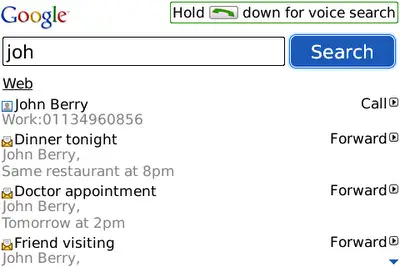
If you’re a BlackBerry user, you might be glad to know that Google is pushing out a new search facility that will let you find email and contact numbers on your BlackBerry devices. The new search feature allows you to just type in or speak the name of  your contact and Google Mobile app will search through your device to find the email or contact number. It’s a pretty useful application especially if you have amassed quite a number of emails and scrolling through each one of them is already a painful task.

Even better is the fact that you can reply to the email or forward it as soon from the search results that will be displayed by the Google Mobile App. The new feature also allows you to quickly call a contact or send an email or SMS just by typing the first few letters of your contact’s first or last name. The app will also suggest contacts as you type as well as present your most frequently contacted person on top of the suggestion list.

If you don’t want this feature, you can still download the app and just turn off Phone Search from the options screen. The new Google Mobile App search feature requires BlackBerry OS version 4.5 or higher.

To download the app, simply point your BlackBerry’s mobile web browser to m.google.com.

Filed Under: Mobile, Software Tagged With: BlackBerry app, google mobile app

  • « Go to Previous Page
  • Page 1
  • Interim pages omitted …
  • Page 15
  • Page 16
  • Page 17
  • Page 18
  • Page 19
  • Interim pages omitted …
  • Page 33
  • Go to Next Page »

Primary Sidebar

Privacy Policy

Copyright © 2025 · News Pro On Genesis Framework · WordPress · Log in