• Skip to primary navigation
  • Skip to main content
  • Skip to primary sidebar
  • Internet
    • Browsers
    • Cloud Computing
    • Online Video
    • Search Engines
    • Web 2.0
  • Mobile
    • Android Apps
    • Apps
  • Software
  • Funny Stuff
  • Social Networks
  • Web Tools

Daily Bits

  • Home
  • About
  • Archives
  • Contact
  • Advertise

Arnold Zafra

YouTube Intros HTML5 Video Player, What Does it Do Again?

April 24, 2023 by Arnold Zafra

It’s been pretty busy on the YouTube side lately. Awhile ago, YouTube announced a redesigned video home page. But before that, YouTube also announced something about its current testing of a new video player – this time it’s an HTML5-based video player.

HTML5 is a new web standard which is becoming popular recently, well simply because it offers new features to everyone’s web experience. And as a basis for its new video player, the YouTube HTML5-based player will support video and audio playback seamlessly without the need for additional browser plug-in. For as along as you an HTML5 compatible browser and support for the right audio and video codec, the YouTube HTML5-based video player will give you almost the same experience when watching YouTube video using its default Flash player.

While the YouTube HTML5-based video player seemed a fully functioning player, it however has several limitations. Well, that’s understandable because it is still at an early stage of development. Specifically the video player does not support video with ads, captions or annotations. It will also require a browser that supports video tagging and h.264 encoded video. Known browsers to support HTML5 are Chrome, Safari, Chrome Frame and Internet Explorer.  Firefox is not yet supported, but YouTube promises to include it and other browsers as well, in the future.

You can try using the HTML5-based video player by visiting the YouTube TestTube site and selecting HTML5 or simply go straight to this page to opt-in for the new video player. But honestly, if you don’t have a problem viewing YouTube videos with your browsers current setting, there’s really no point in trying it out. It’s basically the same thing minus the Flash component.

But still worth a try.
Filed Under: Media, Online Video Tagged With: html5, youtube

Facebook Quietly Rolls Out Post Insights for Pages

April 24, 2023 by Arnold Zafra

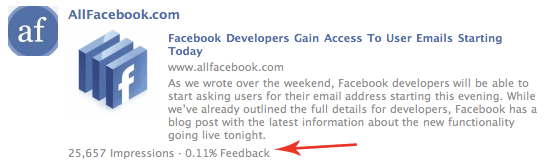
Facebook has quietly roll out a new post analytics tool which will be most useful for Facebook Page administrators.  If you run and maintain a Facebook page, this new post insights tool will give you how many impressions each post on your page have received. In addition, it also tells you what percentage of those impressions resulted in corresponding actions – likes, comments, or even much better clicks if you’re promoting something on your Facebook page.

In short, the post insights tool is short of being your usual web analytics tools.  The post insights is currently rolling this out to few Facebook pages administrators. More administrators would have this on their respective Facebook page soon.

While this may not be useful to you if you don’t maintain a Facebook page, those who have been using Facebook for brand marketing will definitely find this tool very useful for their marketing campaigns. Somehow it beats Twitter which does not have this feature yet.

The display is impressions and percentages are pretty simple.  Here’s a screenshot given by All Facebook blog.

Filed Under: Social Networks Tagged With: facebook analytics, Facebook Pages, post insights

Facebook Lets You Communicate with Apps via Email

April 24, 2023 by Arnold Zafra

Facebook has just announced a new way of letting your stay connected with your favorite Facebook apps. It’s really just a matter of applying the same email notifications that you receive whenever you are tagged on a photo or receive a message from your Facebook friends. And like other Facebook add-ons that requires access to your email account, this new Facebook feature will never receive your email address unless grant application developers the right to email you.

So, how does this new feature work? Starting probably today, you will start seeing dialog boxes on your application pages containing a question from app developers whether you want to receive notifications about their apps, coursed through your email address, of course.

And why would you want to receive email notifications from Facebook app developers? Honestly, I don’t see any good reason why. But the Facebook blog said that it will give you more detailed and interesting information from developers about your favorite Facebook applications. These information include – receipts of purchases, newsletters as well as notification of actions with their apps.

Of course, like any other email notification set-up, Facebook apps notification feature can be easily cancelled anytime. All you need to do is to hit the “unsubscribe” button located at the bottom of the email notifications that you received.

This new feature is just one of the many new features that Facebook is planning to  launch this year.

Filed Under: Internet, Social Networks Tagged With: facebook apps, notification

Whitehouse.gov Goes Mobile with iPhone/iPod App

April 23, 2023 by Arnold Zafra

President Obama’s administration continues to take full advantage of technology in reaching out to millions of Americans who by now are getting into the mobile phone syndrome. The latest of the administration’s foray into technology is by way of an iPhone/iPod Touch app that debuted recently at the iTunes store. The Whitehouse iPhone App (iTunes Link) promises to connect with Americans by delivering real-time content from Whitehouse.gov to American iPhone users.

One outstanding feature of the Whitehouse iPhone/iPod Touch app is the streaming of videos coming from the White House itself. It allows you to watch President Obama’s attendance to public events at the White House, web chats with members of the Administration as well.

It’s a pretty cool app, if I may say so. As an opening salvo to the launch of this app, The Whitehouse.gov iPhone will be streaming Pres. Obama’s State of the Union address happening next week.

In addition to its iPhone/iPod app, Whitehouse.gov is also planning to launch a new mobile-friendly version of its website. It would be interesting to note whether the introduction of a new mobile internet access will be as successful as other top iPhone apps or give Whitehouse.gov more users.

Filed Under: Internet, Mobile Tagged With: iPhone app, whitehouse.gov

Yelp for iPhone v4.0 Adds “Check Ins” Feature

April 23, 2023 by Arnold Zafra

Remember Foursquare?  Well, it seems that its “check ins” feature has become all the craze among iPhone users, that one of its rivals, Yelp for iPhone has just added the same feature to version 4.0 of its own native iPhone app. Actually Yelp for iPhone has been around longer than Foursquare but didn’t quite get the same enthusiam from iPhone users.

With the release of Yelp for iPhone v4.0, Yelp hopes prevent Foursquare’s possible break-out in the mobile location service arena.

So, what is this “Check-Ins” feature all about? It’s a way for you to broadcast that you are at a business to your friends on Yelp, Facebook or Twitter. Specifically, you can broadcast the following:

  • Your activity via your Yelp for iPhone profile page
  • Opt-in alerts including “Push” notifications
  • A Leaderboard on Yelp for iPhone
  • A Map that will also show the “Check-ins” of your friends nearby and your check-in count next to your Yelp star rating if you’ve written a review on Yelp.com
  • Where you’ve checked in on Monocle, Yelp’s AR feature launched in August
  • Active users of Yelp Check-ins can also earn “Regular” status of highly-frequented  businesses.

Aside from the “Check-Ins” feature, Yelp for iPhone v4.0 also rolled out some new features including the ability to log into your Yelp.com profile and see and interact with your Yelp profile as you would on Yelp.com.

You can now also see and invite friends from your iPhone’s address book to join you on Yelp, share your check-ins and quick tips via Facebook Connect and Twitter. You can also check out Monocle, Yelp’s augmented reality feature.

Overall, Yelp for iPhone is a pretty good iPhone app. Yelp for iPhone is a free app and you can download it from here. (iTunes Link)

Filed Under: Mobile, Social Networks Tagged With: check-ins, yelp for iphone

Google Mobile App for BlackBerry Gets Email and Contacts Search Feature

April 23, 2023 by Arnold Zafra

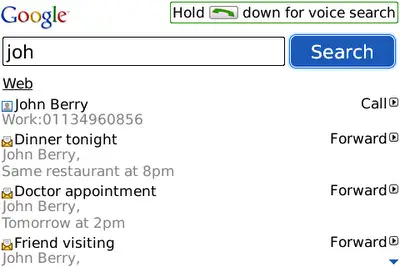
If you’re a BlackBerry user, you might be glad to know that Google is pushing out a new search facility that will let you find email and contact numbers on your BlackBerry devices. The new search feature allows you to just type in or speak the name of  your contact and Google Mobile app will search through your device to find the email or contact number. It’s a pretty useful application especially if you have amassed quite a number of emails and scrolling through each one of them is already a painful task.

Even better is the fact that you can reply to the email or forward it as soon from the search results that will be displayed by the Google Mobile App. The new feature also allows you to quickly call a contact or send an email or SMS just by typing the first few letters of your contact’s first or last name. The app will also suggest contacts as you type as well as present your most frequently contacted person on top of the suggestion list.

If you don’t want this feature, you can still download the app and just turn off Phone Search from the options screen. The new Google Mobile App search feature requires BlackBerry OS version 4.5 or higher.

To download the app, simply point your BlackBerry’s mobile web browser to m.google.com.

Filed Under: Mobile, Software Tagged With: BlackBerry app, google mobile app

  • « Go to Previous Page
  • Page 1
  • Interim pages omitted …
  • Page 19
  • Page 20
  • Page 21
  • Page 22
  • Page 23
  • Interim pages omitted …
  • Page 48
  • Go to Next Page »

Primary Sidebar

Privacy Policy

Copyright © 2025 · News Pro On Genesis Framework · WordPress · Log in