• Skip to primary navigation
  • Skip to main content
  • Skip to primary sidebar
  • Internet
    • Browsers
    • Cloud Computing
    • Online Video
    • Search Engines
    • Web 2.0
  • Mobile
    • Android Apps
    • Apps
  • Software
  • Funny Stuff
  • Social Networks
  • Web Tools

Daily Bits

  • Home
  • About
  • Archives
  • Contact
  • Advertise

Search Results for: "DATA"

Technology Does Help in Mental Development

February 25, 2023 by Arun

How much of technology forms part of your daily routine ? Research at UCLA points to increased brain activity from technology – in this case using search engines.

An excerpt from TechNewsWorld:

Web search novices also showed increased activity, but to a lesser extent than their more technologically savvy counterparts.

“The other part of the study we are analyzing the data on now is that when we took the computer naive people and gave them a chance to practice searching the Internet, within a week their brains started looking like the people who had done it for years,” Small explained.

Locating the relevant piece of information from the barrage of results returned by a search engine can be an intensive mental activity. This is owing to the fact that results returned by search engines seldom the most desired and a lot more tweaking, query refining and browsing is required to locate the exact information.

It would take many more years before a conclusive research can be done on the effect of technology on mental development. But it would suffice to say that a small dose of technology could do a lot of good.
Filed Under: Search Engines

Virtual Browsers

February 23, 2023 by Arun

Virtual browsers are one of the two technological twists that have come to the browsing world. The other being 3D Browsing. With increased focus on security over internet activities, the concept of virtual browser makes for a secure browsing environment that would ideally not take down your system due to some malicious activity with or without your knowledge. I use the word ideally here because virtual browsers are not exactly proofed from all known and unknown exploits.

Virtual browsers provide for more secure browsing by a process called Sandboxing. Sand-boxing is the creation of a safe execution environment on a host machine so that changes made from one process do not affect the functioning of the system. The processes running inside a sandbox have limited access to the system resources and importantly to the critical resources. Thus the host as such is as secure as the absence of flaws in the sand-boxing program itself.

Coming back to browsers, the main criteria to consider when choosing among various sand-boxed environments is the option of how much fine grained control you have on the data that is stored in the sandbox session and movable to the host machine. Recently, HP in association with Mozilla announced its virtual browser. Google Chrome also features a sand-boxed approach to its browser tabs – which means that each tab runs as a separate process and does not crash all other tabs in event of any failure. This technology has been a reason why Google acquired Greenborder, a maker of secure software.

Virtual browsers are a good choice to make your web browsing experience much safer.

Filed Under: Browsers

How Cloud Computing Is Changing the World

February 19, 2023 by Admin

There are good chances you already came across the term “cloud computing” once or twice, even if you don’t completely grasp the meaning of the term. If that is the case, check out this article on Business Week titled How Cloud Computing Is Changing the World. It gives some good examples of how cloud computing is starting to shape the way companies do business, and individuals interact with IT. Here is a small quote:

The term “cloud computing” encompasses many areas of tech, including software as a service, a software distribution method pioneered by Salesforce.com about a decade ago. It also includes newer avenues such as hardware as a service, a way to order storage and server capacity on demand from Amazon and others. What all these cloud computing services have in common, though, is that they’re all delivered over the Internet, on demand, from massive data centers.

A pit-stop on the Wikipedia article for cloud computing can help also. This is probably one of the most important shifts that we will see on the coming years, so make sure to understand it.

Filed Under: Internet

8 of the Best Adobe AIR Applications

February 18, 2023 by Jonathan

Adobe AIR showed a lot of potential during its period of public beta but unfortunately had very few applications that really took advantage of the technology. Thankfully over the last month or so we have begun to see some impressive and useful applications being released.

Here is my pick of the current offerings:

1. Alert Thingy

A favourite of many Alert Thingy started as a FriendFeed application but has since added support for Twitter and the ability to upload photos to Flickr. If you are a user of these services then you will love being able to access the services from within the same interface and window.

2. Guitar Scales V2

This is a great little application, although obviously it will only appeal to a small group of you. Using the virtual fretboard like below you can find any scale for a range of options including root notes, scale types, number of strings, number of frets and tunings.

This information can be found elsewhere online, but I don’t know one other resource that freely provides this information in a way that rivals Guitar Scales for simplicity and functionality.

3. Klok

“Klok is a tool intended to be used by individuals, like myself, who have a need to track the time they spend on projects, tasks or anything else for that matter.” If you find Klok to be a bit more complicated then what you need, I recommend Timecloc which is much simpler and is essentially a stop watch, although you can still add different projects.

4. ReadAir

“ReadAir is an OSX Themed Desktop Client for Mac or Windows. Built with Adobe Air” and available for download from Google Code. I wasn’t actually aware of this one till today due to it not being listed in the AIR application directory. DailyApps discovered it and ran an article about it yesterday.

5. Twhirl

Twhirl is another Twitter and FriendFeed client. Its main feature is the ability to be signed into multiple Twitter and FriendFeed accounts simultaneously. It has a tool for shortening URLs, you can update Pownce and Jaiku, upload pics to TweetPic and use TweetScan to search for tweets.

6. Pownce

pwnceshotI really wonder what the future of Pownce is. Successful startups all generally have one specific focus that can generally be summarized in one word or phrase. Google is search, Twitter is micro-blogging, Flickr is photo sharing and so on. Pownce seems to have a little of everything and as such is making little headway in any.

However If you are a Pownce user however then this application is a must; you’ll find it a great deal easier staying up to date on your contact’s latest notes, files and photos etc. An option I feel is lacking is the ability to minimize to the system tray.

7. Ebay Desktop

This is one of the first, and still one of the best, AIR applications. It’s impressive in that it really goes beyond replicating an online service on the desktop and instead extends and enhances the experience. Not only does it look great, but Ebay Desktop takes a far more graphical and interactive approach with the browsing, tracking and buying and selling of items.

Drag and drop functionality, instant search results and a real time clock that counts down to the end of the auction are some of the features in this app. If you are even an occasional Ebay user its worth giving Ebay Desktop a try.

8. Google Analytics

Google Analytics is a favourite of many bloggers as it provides easy access to all your Analytics data and profiles from your desktop. It’s attractive and extremely useful if you use Analytics on a regular basis. (You can also get Google Trends on your desktop with XeGTrends)

Filed Under: Internet

AdAge Claims Online Advertising is Overhyped

February 17, 2023 by Admin

And I don’t agree with it.

Their first argument is this one:

The inconvenient truth is that for all its new-media spin, display advertising is “old” media — a commercial message to be placed next to editorial or entertainment content. And we know by now that measured-media growth has pretty much ground to a halt as marketers continue to increase their dollars in unmeasured disciplines such as web development, public relations and database marketing at the expense of paid advertising.

Well, I think there is a huge different between an ad that appears on a paper newspaper and ones that appear on the online website of that same newspaper. For one thing, the results of the latter are much more measurable. You can track how many times the ad got displayed. How many people clicked on the ad. How many people ended up purchasing a product after that click. Heck, you could even know the country, browser and operating system of the people that saw the ad.

When hard economic times come, companies will want to spend their money in places where they can track the results more efficiently.

The the article questions:

Sure, dollars are shifting within those media budgets, with some moving out of traditional media into interactive. But most of the top 100 advertisers that wield the big budgets are still primarily TV and print spenders. The question is: Should the fact Procter & Gamble spends only 1.5% of its marketing budget on display ads be viewed as a warning signal by online ad sellers, or as an opportunity

The author of the article apparently thinks that this is a warning signal, he goes: “For all its glory, the internet still has not proven itself capable of being a primary branding medium.”

Well I think he is wrong, I think that the fact that the advertisers still spend 90% of their money on television is definitely an opportunity for online advertising. Why? Because eventually everything is going to migrate to the web. That is, everything is going to travel on IP. Your television, your telephone conversations, and even the bits that your fridge will send to the local supermarket when you run out of beer cans.

Sure it might still take some years for that to realize, but it is a matter of when and not a matter of if.

As a result, I think that online advertising will keep growing strong, and perhaps new forms of advertising will emerge, but they will certainly be based on web technologies.

Anyway you can read the full article here and take your own conclusions.

Filed Under: General

Security Trends of 2008 Part 4: The Dreaded Storm and MPack

February 16, 2023 by Loki

Picking up from the last time after my two-month long hiatus, I bring you now the greatest security threats of 2008: Storm and MPack.

Storm Blows Web 2.0 Away

The Storm malware is actually a collaboration of Web 2.0 techniques like social networking and dynamical associations towards a system. Simply put, it uses the most common web techniques in a two-stage attack, which we discuss later.

According to IronPort’s 2008 Internet Security Trends, Storm-class malware has its key characteristics:

Self-Propagating – sends massive amounts of spam to spread. Users are directed to multiple changing HTTP URLs, which serve Storm malware. If infected, the system then becomes part of the network.

Peer-to-Peer – where previous botnets were controlled from central­ized locations through a hierarchical management structure, nodes communicate through a unique peer-to-peer communication protocol. This makes it difficult to track the total size.

Coordinated – Storm will send spam campaigns that point to webpages hosted by other computers, showing amazing sophistication in the way the network creates its attacks.

Reusable – can be used for many kinds of attacks: spam, phishing, DDoS, it has even been known to compromise IMnetworks and post blog spam, making it a threat to many different protocols.

Self-Defending – Storm watches for signs of reverse engineering or analysis. It repeatedly launched massive denial of services attacks against researchers and anti-spam organizations.

Through these, Storm was able to accomplish a huge number of PDF, XLS, MP3 spam outbreak over the course of 2007 and even up to today.

Storm Signaling: The Two Attack Stages

Storm uses e-mail functions and interconnectivity of Web 2.0 in order for its two-stage attack to take place. Also, Storm creators have come up with a “drive-by” browser exploit that infects computer simply through a web page visit, no downloads needed for infection!

Once a Storm malware infects a computer, it connects its victim computer into a peer-to-peer network, the Storm Network. This network is a modified design, decentralized and excessive, unlike its older, centralized ancestor. The creators seemingly acknowledged the fact that a centralized network is easy to destroy just by “chopping the botnet’s head off.”

Apart from the peer-to-peer feature, Storm also needs to maintain itself via self-defense measures. It utilizes Distributed Denial of Service to both prevent people from exploring the innards of a Storm malware, and launch a retaliatory attack to the onlookers.

Once the Storm network has possession of the victim system, it can instruct its victim to do either send a recruitment spam and aid in the network growth, serve malicious web pages, attack instant messengers, provide fast-flux and domain resolutions, or post blog spams on other websites. These actions can ensure that Storm will persist even if some of its victims are paralyzed, because it launches large-scale attacks that recruit other victims into its network.

Storm doesn’t actually attack head-on, as most of its deceased ancestors did. Unlike those suicidal malware, Storm-class malware seem to value its life, that it focuses more on its staying power than its destructive one. It is very frightening to know that while the Storm hasn’t completely been eradicated, its designers are improving it at a fast pace.

MPack: The Marketed Malware

MPack is actually a malware kit that is sold for anywhere between $700 and $1, 000. It is a PHP-based malware kit being sold by a certain group of Russian software developers known as the Dream Coders Team. In a CNET interview, Yuval Ben-Itzhak, chief technical officer of security company Finjan, stated how dangerous the Mpack kit is. “Without any computer science skill or any security background, you can install this package on any Web server and start to infect people with malicious code,” said Ben-Itzhak in the interview.

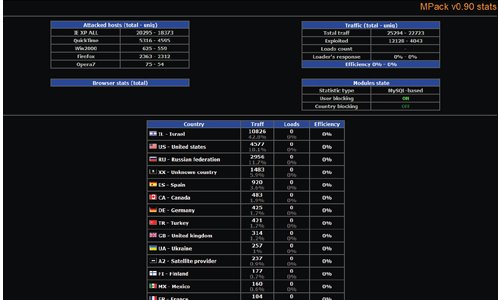
The commercial malware, as I would like to call MPack, is designed specifically for web-based attack, pretty much like Storm. It is deployed using an iFrame attack placed silently into legitimate websites, keeping infection and, interestingly enough, its attack statistics. Further, its creators, the Dream Coders Team, gives one-year support, fresh exploits (like the one Storm has), and add-ons that can cost anywhere from $50 to $300,possibly based on attack modifications.

While having these kind of malicious kits in the market is not that new, support services do seem to be appealing, especially for a novice who wants instant ability over malware infection.

MPack Attacks!

MPack kit owners are provided with an administrative interface to launch their attacks, usually by the same drive-by exploits utilized by Storm. Further, the interface keeps the statistics on both viewers of an infected web page and the successful attacks it carried on. It somehow gives satisfaction to the user for purchasing the malware kit, not to mention the support services and “additional arsenal” that can make a novice a force to reckon with.

mpack

Storm and MPack malware have been spreading like wildfire since mid-2007 that it has become very alarming. The things most feared about the two are their peer-to-peer and self-defense mechanisms that allow the malware to creep into a network and destroy it from within. Also, considering that the protocol used by both Storm and MPack is HTTP, it’s really hard to recognize a social malware from a safe web page. Without a plug to pull or a switch to turn it off, it has come to attention that these malware can be considered professional in a sense – there are experts behind the longevity of these malicious software. The question that arises now would be: How can we avoid being attacked by these malware?

For Safety And Precaution

Increased sophistication. That phrase summarizes the greatest threats of 2008, although conventionally, malicious programs still do what they do best: advertise, infect, steal data, and spread. In their line of evolution, developers learned that a one-step approach is no longer plausible, and the improved two-step route they are taking is more than anyone can handle.

With a new way to launch attacks while ensuring a defensive mechanism for themselves, Storm- and MPack-like malware are hard to deal with. They easily render previous security measures obsolete. In order to protect your system from those malware, new ways are being preached and practiced. IronPort’s 2008 report summarizes these safety measures into five:

1. Secure web traffic. The reputation of a website is a key to determine how plausible a malware can infect it. Let’s have Yahoo for example. It’s reputation as legitimate and virus-free makes it hard for user-generated malware to penetrate it.

2. Deploy preventive protection for e-mail. The alarm brought about by Storm- and MPack-class malware calls for multi-level spam defenses, commonly available in our favorite e-mail service providers. Deploying these defenses can easily detect and separate possible malware attachments.

3. Protect against corporate data loss. Commonly, attacks from malware scans your hard drive to collect private information. It wouldn’t hard a company if it would require its employees to scan outgoing transfers and connections for possible policy violations. It would show how cautious your company is and give it a reputation for safety, adding to its market level.

4. Prevent “phone-home” activity. It is very important to scan or totally block outgoing “phone home” activities, as the sender might be malware-infected, retrieving attack commands or uploading data back to operators.

5. Track important communications. New technologies are available for real-time tracking of your e-mail messages, which works similar to physical package shipping. Added care wouldn’t hurt to our noble and easily accessible e-mail accounts, as they have become an integral part of our virtual lives, while others keep on attacking us through them.

Malware sure has spread everywhere on the Internet, but we should still be the masters of our own virtual spaces. I hope this four-part series will aid you through the rest of 2008! Happy surfing!

Filed Under: Security

  • « Go to Previous Page
  • Page 1
  • Interim pages omitted …
  • Page 14
  • Page 15
  • Page 16
  • Page 17
  • Page 18
  • Interim pages omitted …
  • Page 52
  • Go to Next Page »

Primary Sidebar

Privacy Policy

Copyright © 2025 · News Pro On Genesis Framework · WordPress · Log in