• Skip to primary navigation
  • Skip to main content
  • Skip to primary sidebar
  • Internet
    • Browsers
    • Cloud Computing
    • Online Video
    • Search Engines
    • Web 2.0
  • Mobile
    • Android Apps
    • Apps
  • Software
  • Funny Stuff
  • Social Networks
  • Web Tools

Daily Bits

  • Home
  • About
  • Archives
  • Contact
  • Advertise

YouTube Still King of Online Video, But Facebook is Growing Fast

April 29, 2023 by Arnold Zafra

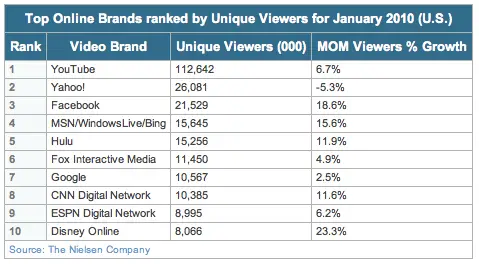
NielsenWire has just published their latest online video metrics report and as expected like it has been the past couple of years, YouTube is still the most visited online video site. But what’s interesting to note from Nielsen’s stats is how fast Facebook is growing as an online video channel.

First,  some facts and details. According to the NielsenWire’s report, the number of unique viewers of online video increased y 5.2% year-over-year, from 137.4 million unique viewers in January 2009 to 142.7 million the same month this year. And the fastest growing online video sites include the likes of Disney Online with 23.3% growth, MSN/WindowsLive/Bing with 15.6% and of course Facebook with 18.6% growth during the said period.

YouTube on the other hand managed to posed only a 6.7% growth but it still remains at the top of the list with a commanding 112.6 million unique viewers.

Now, as I said, it’s quite interesting to note how fast Facebook is growing as a video channel. It only goes to show that more Facebook users are sharing online video as well as watching them online via Facebook. What is ironic about this is that most of those videos were actually embedded from the YouTube site.

Perhaps, Google has not yet noticed this trend especially since YouTube continues to be the number 1 online video site. But at the rate that Facebook is growing, it might just be a matter of time before it catches up with YouTube. Unless of course Google does something to prevent this from happening. Hopefully Google won’t do something drastic in the future.

Filed Under: Internet, Online Video Tagged With: disney online, facebook, youtube

In Case You Missed It, You Can Also Create a Buzz on Google Reader

April 29, 2023 by Arnold Zafra

So, have you started “buzzing around?” Has Google enabled Google Buzz on your Gmail? Or have you tried it on your mobile phone?  How was it? Revolutionary? Innovative?  Well, in case you might have missed it due to the influx of buzz that Google has created with the launch of Google Buzz, the service is actually also available in Google Reader. That is you can also post the items from your Google Reader as a buzz on your Gmail.

To activate this feature, all you need to do is to link up your Google Reader account to Gmail Buzz. And while you’re there, you might also want to link up other current services that are tied up with your Google Profile.  Once set up, everything that you share on Google Reader will be automatically be posted to your Gmail Buzz. That’s why Google Buzz is called a social sharing service.  Once your Reader item is posted as a buzz, people who are following you will be able to post comments to the items you shared.

The good thing about this, in case you didn’t notice it, is that the people you follow and who follow you on Google Reader are also the same set of people in your Gmail Buzz.

This is why I like Google Buzz so far. It’s like partaking of a new product without exerting to much effort on learning something new. Something which Google Wave did, and which is gradually leading it to its downfall.

Got one more room for a person to follow? Follow me on Twitter, I mean on Google Buzz – http://www.google.com/profiles/noli725.

Filed Under: Internet, Social Networks, Web Tools Tagged With: buzz in google reader, google buzz

YouTube Turns On Safety Mode Video Viewing

April 29, 2023 by Arnold Zafra

In its effort to provide users with a more controlled and safe environment, YouTube has rolled out Safety Mode. This is an opt-in setting that will let you screen out outright and potential objectionable contents from showing up on your YouTube account channel, which you definitely don’t want your friends and family to see when they check out your YouTube video.

I’m pretty sure at some point in your YouTube experience, you’ve seen examples of these contents. It may be newsworthy video depicting violence at its gruesome details. Since this content does not contain any sexually objectionable content, YouTube will not censor them. So, it is up to you to determine whether these contents will be displayed on your YouTube account. If you don’t want to – then comes YouTube in Safety Mode.

To activate Safety Mode on your YouTube account, just click on the link at the bottom of any video page.

Safety Mode may not be a full-proof system yet, but it is certainly a step in the right direction. It may not guarantee safe video watching at all times, but at least Google is doing something to remedy this issue and provide us all with a “safe environment”  when watching YouTube videos.

And that alone is a great achievement.

Filed Under: Internet, Online Video Tagged With: safety mode, youtube

Yahoo and Microsoft React to Google Buzz

April 29, 2023 by Arnold Zafra

If you’ve been monitoring tech headlines the past couple of hours, you’d know that the hottest buzz right now is none other than Google Buzz. Credit it to Google for creating yet again another noise upon launching a significant product or service and for soliciting a much needed reaction from its rivals – Yahoo and Microsoft.

In case you’ve missed the discussion thread online, Google Buzz is purported as Google’s approach to social sharing.  The main service sits right inside Gmail Inbox but you can also use the service on your iPhone or Android devices. You can read more about Google Buzz  in Gmail and Google Buzz for Mobile at 901am.

So, how did Yahoo and Microsoft reacted to Google Buzz? Microsoft was a bit short and yet direct to the point, as quoted by TechCrunch.

“Busy people don’t want another social network, what they want is the convenience of aggregation. We’ve done that. Hotmail customers have benefitted from Microsoft working with Flickr, Facebook, Twitter and 75 other partners since 2008.”

While Yahoo’s reaction was more elaborate by saying that they have the same service for a year now via Yahoo! Updates. Silicon Alley Insider shares Yahoo’s email explaining that they had that same product for over a year now.

It’s been almost a year and a half since we first launched Yahoo! Updates – a social feature that lets people share their status, content and online activities and stay connected to what their friends and family are doing on Yahoo! and across the Web – and we wanted to share the latest on what’s happening with Updates…

So, what do you think? Did Google just copied existing services of its two rivals? Or did Google in fact copied the services of some other location-aware, social recommendation sites such as Yelp, Gowalla, FourSquare and others?

Update: Incidentally, Google Buzz for Mobile is now on. You may check it out by pointing your iPhone or Android phone’s browser to buzz.google.com.

Filed Under: Internet, Mobile Tagged With: google buzz, google buzz for mobile

eBay Seeks Your Help to Make its Services Better via its Garden of New Features

April 28, 2023 by Arnold Zafra

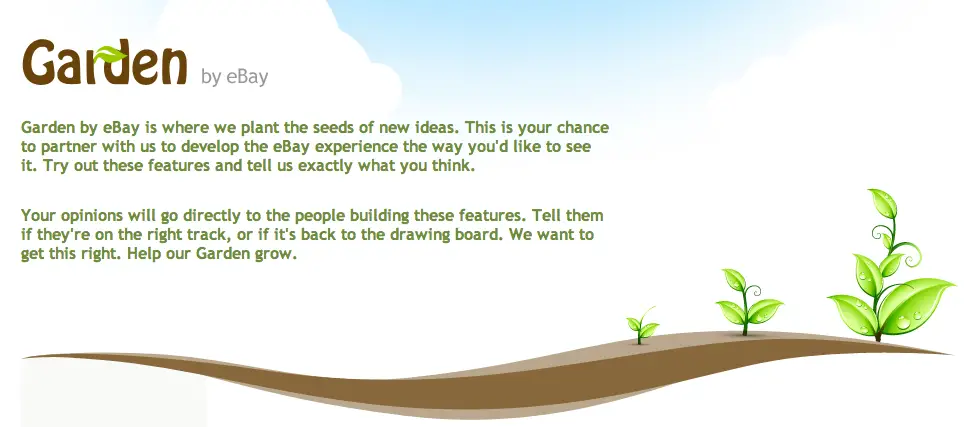
eBay has planted some seeds on its new garden to hoping to reap some valuable fruits later on, so to speak.  I’m talking about Garden by eBay which was just announced and is describe as an area on eBay that will allow eBay members to test new features and offer input on suggested improvements and changes on the eBay site.  Garden by eBay hopes to gather user inputs on initial concepts or seeds that it hopes to fully grow into a full product or feature. All for the glory of finding the best deals online, folks!

Alright, in other words, it’s Gmail Labs for eBay. But since, Labs is already an overused term, eBay decided to use Garden instead. Hence putting some environmental relevance to the project.

So, what does Garden by eBay actually offers? Or what is really, officially?  Garden by eBay is a new experimental space where eBay users can test, interact with, and offer input on existing or new ideas for eBay.com’s products and features. Member inputs will provided directly to the eBay team in-charge of new, proposed or existing eBay features. Hence, bringing sellers and buyers directly into the innovation process and letting eBay to introduce, test and roll out new features faster.

To kick off this project, there are currently two available seeds in the Garden. First is the new “Streamlined Search” which is intended to make browsing and viewing search results on eBay easier and streamlined. It presents a cleaner view of eBay inventory and a more efficient way of browsing items. It also lets users compare auction and Buy it Now listings side-by-side, refine seaches and other useful information.

The other available feature for testing is Diamond Ring Designer which has been under testing for quite some time now but eBay wants to get some more feedback from eBay users.

To access Garden by eBay, click here.

Filed Under: Internet, Web 2.0 Tagged With: eBay, garden by ebay

Facebook’s New, Simplified Home Page Looks a Bit Complicated

April 28, 2023 by Arnold Zafra

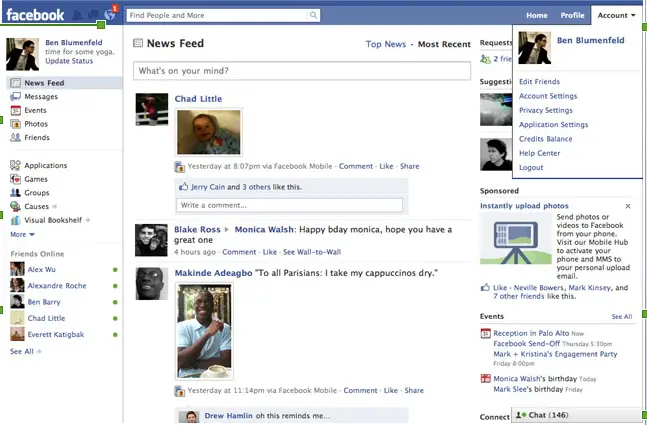
I’ve been waiting for Facebook to roll out the new and simplified home page on my account for the past couple of days and awhile ago, it finally did. I thought Facebook was acting up again as it did the past couple of days. Anyway, there it was – the new Facebook home page. And do I like it? Like with previous Facebook enhancements, I always welcome changes and enhancements with glee. And while the new Facebook home page looks all sleek and dandy right now, some of you may find it a bit confusing, like I did.

Let’s take a look at what were changed in the new Facebook home page. First thing you’d notice is that the search box which is now located at the top left corner of the page. In between the search box and the Facebook logo are the new request, messages and notifications icons.

Then on the left side, you’d also noticed something different, particularly the lower portion where it now lists your friends who are currently online. Clicking on any of your friends will fire up Facebook chat.

Now if you go back to the upper portion and click any of the content links, say photos – it will give you all the photos of your friends not your own photos. This got me confused a bit as I was hoping to see my uploaded photos rather than my friends’.

Another thing that got me confused is the News Feed. Wasn’t it just recently that Facebook introduced  Live Feed and News Feed? It seems that Facebook heeded the complaints of many Facebook members and decided to let go of the Live Feed stream. You are now given instead two options of viewing News Feeds – the Top News and Most Recent. The later of course replaces the previous Live Feed, although the time difference between these two can be as short as a couple of hours.

Overall, I find the new look and organization of the Facebook home page refreshing. It sort of gives you a fresh new start at your Facebook experience.

So how do you like the new Facebook home page so far? Any complaints? Please share it with us by leaving a comment.

Filed Under: Social Networks Tagged With: facebook home page

  • « Go to Previous Page
  • Page 1
  • Interim pages omitted …
  • Page 73
  • Page 74
  • Page 75
  • Page 76
  • Page 77
  • Interim pages omitted …
  • Page 285
  • Go to Next Page »

Primary Sidebar

Privacy Policy

Copyright © 2025 · News Pro On Genesis Framework · WordPress · Log in