• Skip to primary navigation
  • Skip to main content
  • Skip to primary sidebar
  • Internet
    • Browsers
    • Cloud Computing
    • Online Video
    • Search Engines
    • Web 2.0
  • Mobile
    • Android Apps
    • Apps
  • Software
  • Funny Stuff
  • Social Networks
  • Web Tools

Daily Bits

  • Home
  • About
  • Archives
  • Contact
  • Advertise

Best Online Flash Games: The Last Stand

February 16, 2023 by Admin

If you ended up wasting too much time with the previous two games that we covered (Helicopter and Desktop Tower Defense), this one might be the solution. The Last Stand is a cool game don’t get me wrong, and it is very graphically appealing for a flash game, but it is not that challenging.
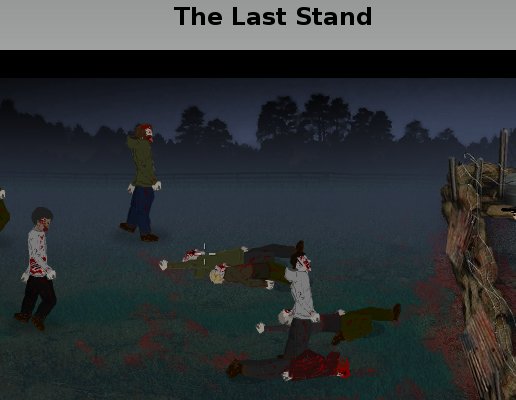
the last stand

As you can see from the image above the game is about killing zombies. There is a minimum of strategy involved as you need to allocate your day time between finding survivors, weapons, and repairing the barriers that protects you. Once you get the M-40 weapon, though, the game is over.

Filed Under: Funny Stuff

Security Trends of 2008 Part 4: The Dreaded Storm and MPack

February 16, 2023 by Loki

Picking up from the last time after my two-month long hiatus, I bring you now the greatest security threats of 2008: Storm and MPack.

Storm Blows Web 2.0 Away

The Storm malware is actually a collaboration of Web 2.0 techniques like social networking and dynamical associations towards a system. Simply put, it uses the most common web techniques in a two-stage attack, which we discuss later.

According to IronPort’s 2008 Internet Security Trends, Storm-class malware has its key characteristics:

Self-Propagating – sends massive amounts of spam to spread. Users are directed to multiple changing HTTP URLs, which serve Storm malware. If infected, the system then becomes part of the network.

Peer-to-Peer – where previous botnets were controlled from central­ized locations through a hierarchical management structure, nodes communicate through a unique peer-to-peer communication protocol. This makes it difficult to track the total size.

Coordinated – Storm will send spam campaigns that point to webpages hosted by other computers, showing amazing sophistication in the way the network creates its attacks.

Reusable – can be used for many kinds of attacks: spam, phishing, DDoS, it has even been known to compromise IMnetworks and post blog spam, making it a threat to many different protocols.

Self-Defending – Storm watches for signs of reverse engineering or analysis. It repeatedly launched massive denial of services attacks against researchers and anti-spam organizations.

Through these, Storm was able to accomplish a huge number of PDF, XLS, MP3 spam outbreak over the course of 2007 and even up to today.

Storm Signaling: The Two Attack Stages

Storm uses e-mail functions and interconnectivity of Web 2.0 in order for its two-stage attack to take place. Also, Storm creators have come up with a “drive-by” browser exploit that infects computer simply through a web page visit, no downloads needed for infection!

Once a Storm malware infects a computer, it connects its victim computer into a peer-to-peer network, the Storm Network. This network is a modified design, decentralized and excessive, unlike its older, centralized ancestor. The creators seemingly acknowledged the fact that a centralized network is easy to destroy just by “chopping the botnet’s head off.”

Apart from the peer-to-peer feature, Storm also needs to maintain itself via self-defense measures. It utilizes Distributed Denial of Service to both prevent people from exploring the innards of a Storm malware, and launch a retaliatory attack to the onlookers.

Once the Storm network has possession of the victim system, it can instruct its victim to do either send a recruitment spam and aid in the network growth, serve malicious web pages, attack instant messengers, provide fast-flux and domain resolutions, or post blog spams on other websites. These actions can ensure that Storm will persist even if some of its victims are paralyzed, because it launches large-scale attacks that recruit other victims into its network.

Storm doesn’t actually attack head-on, as most of its deceased ancestors did. Unlike those suicidal malware, Storm-class malware seem to value its life, that it focuses more on its staying power than its destructive one. It is very frightening to know that while the Storm hasn’t completely been eradicated, its designers are improving it at a fast pace.

MPack: The Marketed Malware

MPack is actually a malware kit that is sold for anywhere between $700 and $1, 000. It is a PHP-based malware kit being sold by a certain group of Russian software developers known as the Dream Coders Team. In a CNET interview, Yuval Ben-Itzhak, chief technical officer of security company Finjan, stated how dangerous the Mpack kit is. “Without any computer science skill or any security background, you can install this package on any Web server and start to infect people with malicious code,” said Ben-Itzhak in the interview.

The commercial malware, as I would like to call MPack, is designed specifically for web-based attack, pretty much like Storm. It is deployed using an iFrame attack placed silently into legitimate websites, keeping infection and, interestingly enough, its attack statistics. Further, its creators, the Dream Coders Team, gives one-year support, fresh exploits (like the one Storm has), and add-ons that can cost anywhere from $50 to $300,possibly based on attack modifications.

While having these kind of malicious kits in the market is not that new, support services do seem to be appealing, especially for a novice who wants instant ability over malware infection.

MPack Attacks!

MPack kit owners are provided with an administrative interface to launch their attacks, usually by the same drive-by exploits utilized by Storm. Further, the interface keeps the statistics on both viewers of an infected web page and the successful attacks it carried on. It somehow gives satisfaction to the user for purchasing the malware kit, not to mention the support services and “additional arsenal” that can make a novice a force to reckon with.

mpack

Storm and MPack malware have been spreading like wildfire since mid-2007 that it has become very alarming. The things most feared about the two are their peer-to-peer and self-defense mechanisms that allow the malware to creep into a network and destroy it from within. Also, considering that the protocol used by both Storm and MPack is HTTP, it’s really hard to recognize a social malware from a safe web page. Without a plug to pull or a switch to turn it off, it has come to attention that these malware can be considered professional in a sense – there are experts behind the longevity of these malicious software. The question that arises now would be: How can we avoid being attacked by these malware?

For Safety And Precaution

Increased sophistication. That phrase summarizes the greatest threats of 2008, although conventionally, malicious programs still do what they do best: advertise, infect, steal data, and spread. In their line of evolution, developers learned that a one-step approach is no longer plausible, and the improved two-step route they are taking is more than anyone can handle.

With a new way to launch attacks while ensuring a defensive mechanism for themselves, Storm- and MPack-like malware are hard to deal with. They easily render previous security measures obsolete. In order to protect your system from those malware, new ways are being preached and practiced. IronPort’s 2008 report summarizes these safety measures into five:

1. Secure web traffic. The reputation of a website is a key to determine how plausible a malware can infect it. Let’s have Yahoo for example. It’s reputation as legitimate and virus-free makes it hard for user-generated malware to penetrate it.

2. Deploy preventive protection for e-mail. The alarm brought about by Storm- and MPack-class malware calls for multi-level spam defenses, commonly available in our favorite e-mail service providers. Deploying these defenses can easily detect and separate possible malware attachments.

3. Protect against corporate data loss. Commonly, attacks from malware scans your hard drive to collect private information. It wouldn’t hard a company if it would require its employees to scan outgoing transfers and connections for possible policy violations. It would show how cautious your company is and give it a reputation for safety, adding to its market level.

4. Prevent “phone-home” activity. It is very important to scan or totally block outgoing “phone home” activities, as the sender might be malware-infected, retrieving attack commands or uploading data back to operators.

5. Track important communications. New technologies are available for real-time tracking of your e-mail messages, which works similar to physical package shipping. Added care wouldn’t hurt to our noble and easily accessible e-mail accounts, as they have become an integral part of our virtual lives, while others keep on attacking us through them.

Malware sure has spread everywhere on the Internet, but we should still be the masters of our own virtual spaces. I hope this four-part series will aid you through the rest of 2008! Happy surfing!

Filed Under: Security

Should Your Blog be Licensed by Creative Commons?

February 16, 2023 by Admin

This is a guest post by Heather Johnson.

Even if you aren’t familiar with Creative Commons (CC), you have no doubt spotted one of its various badges at the bottom of Websites. CC is a non-profit organization that allows you to license your work with very specific attributions. Rather than the standard “All Rights Reserved,” your creative work can allow some rights to others, such as non-commercial distribution. Many bloggers have embraced CC licensing, though others have wondered how useful it really is.

Just like anything else related to copyright law, the average Internet user doesn’t quite understand how CC works. If you are new to the concept, here is a useful comic book that explains the basic concepts of CC. (No, I’m not patronizing you. Those comics are official guides to the licensing service.)

CC licenses can be applied to both online and offline work. Writers, musicians, artists and scientists are using CC. Licensing your blog, however, is as simple as cutting and pasting a license badge into your sidebar. This simplicity has drawn heavy skepticism from some in the blogosphere.

PC Magazine’s John C. Dvorak writes:

…this system is some sort of secondary copyright license that, as far as I can tell, does absolutely nothing but threaten the already tenuous ‘fair use’ provisos of existing copyright law. This is one of the dumbest initiatives ever put forth by the tech community. I mean seriously dumb. Eye-rolling dumb on the same scale as believing the Emperor is wearing fabulous new clothes.

Wow, he doesn’t pull any punches there. However, CC could be a bit more useful than he gives it credit for. According to the well-meaning company, CC licenses were drafted with the intention of holding up in court. Although they can’t legally promise anything (who can?), they have taken the time to draft proper fine print for your free licenses. Also, each license comes with “severability” clauses – meaning that, if a provision of your license can’t be enforced in court, that provision can be dropped, leaving the rest of the license intact.

The CC organization is a byproduct of the open source movement, as many writers and developers wish to reasonably share their work with the world. Is the licensing really useful for protecting creative works? Weighing both sides of the CC argument, my personal opinion (as a professional blogger) is that it couldn’t hurt. However, if you have any doubts about copyright issues and your work, it is always best to consult an attorney.

Heather Johnson is a freelance business, finance and credit writer, as well as a regular contributor for Business Credit Cards, a site for comparing the best business credit cards around.

Filed Under: Media

Hilarious Video of Tech Support

February 15, 2023 by Admin

I never worked inside a tech support department, but I do imagine the crazy stuff that must go on there, especially when these guys need to interact with clueless people from non tech-savvy departments.

I came across this video last week, and given its popularity you might have crossed it already. If you not, please take 10 minutes to watch it, it is just brilliant!

Filed Under: Funny Stuff

6 Better Ways to Search Google

February 15, 2023 by Admin

Everyone uses Google these days and often multiple times each day. We use it for work, for fun and for general interest. It has made our researching so much easier. Google makes looking up the most mundane detail simple. Need a phone number for the pizza place down the street? Google it. The possibilities are endless. However, did you know you can get more from your Google searches? It’s true and here are six tips to achieving more productive Google search results:

1. Don’t leave out synonyms
. Suppose you want to perform a search but wish to broaden your search to include similar words to your initial keyword. To achieve optimum results, place the “~” symbol in front of the synonym. For example: “baseball” is your keyword and you want to include “pitchers” in your search. Type in: baseball ~ pitchers.

2. Find out who called you. If an unfamiliar number calls you on your cell phone you can use Google to find out who called you. For example: this number (555-555-5555) called you and you don’t have the number in your list of contacts. All you have to do is search this number in Google by typing: phonebook 555-555-5555. This is the Google phonebook feature.

3. Narrow down your search. Suppose you want to search movies but want to exclude horror movies from your search. When you type in “movies” in your search bar, add “-horror.” Your search will look like this: movies – horror. This will refine your search and eliminate searches yielding any reference to horror.

4. Zero in your search on a specific site. Suppose you want to find out what a particular site has to offer about baseball. Use the “site:whateversite.com” modifier. For example: “baseball” site:whateversite.com. This will search your specific site for references to baseball. This works even if the specific site doesn’t have a search option.

5. Search by file type. The file type modifier allows you to search for documents fitting a particular file type. Suppose you want to find files about baseball that are in PowerPoint. All you have to do is search: “baseball” filetype:ppt.

6. Search by numeric ranges. This feature is rarely utilized but can be very useful. This is perfect if you’re searching a range of years or prices or whatever you want to narrow your search by. For example: Massachusetts governors 1900..1990. This will yield a search of governors in Massachusetts from 1900 up to 1990.

Crowd-funded gadgets, tech, games and other awesome Kickstarter products at the Forevergeek Kickstarter Store

Filed Under: Search Engines

Best Online Flash Games: Desktop Tower Defense

February 15, 2023 by Admin

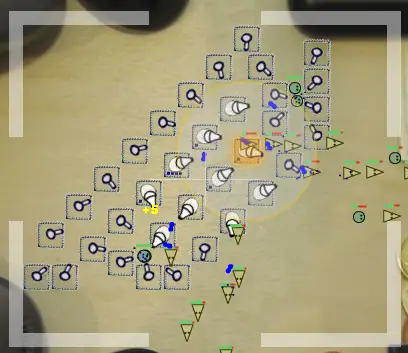
Last week we covered the Helicopter game, and this week we have another classic of the online flash games: Desktop Tower Defense.

desktop tower defense

On this strategy game your mission is to build a defense that will be able to kill all the incoming creatures, not allowing them to reach the other side of the map. You have several towers at your disposal, each with certain attributes. Not recommended if you have a lot of things to do for work today…

Filed Under: Funny Stuff

  • « Go to Previous Page
  • Page 1
  • Interim pages omitted …
  • Page 121
  • Page 122
  • Page 123
  • Page 124
  • Page 125
  • Interim pages omitted …
  • Page 285
  • Go to Next Page »

Primary Sidebar

Privacy Policy

Copyright © 2025 · News Pro On Genesis Framework · WordPress · Log in