• Skip to primary navigation
  • Skip to main content
  • Skip to primary sidebar
  • Internet
    • Browsers
    • Cloud Computing
    • Online Video
    • Search Engines
    • Web 2.0
  • Mobile
    • Android Apps
    • Apps
  • Software
  • Funny Stuff
  • Social Networks
  • Web Tools

Daily Bits

  • Home
  • About
  • Archives
  • Contact
  • Advertise

Admin

100 Cool Things to Do with RSS

February 17, 2023 by Admin

I am a big RSS fan. Not sure if you noticed last May 1st, but we had an RSS Awareness Day going on. I started it.

Anyway browsing on the web today I came across an interesting article outlining 100 cool uses for RSS.

Here are the first 10 ones:

  • Books. Read books with DailyLit. They will send sections to you each day via RSS feed.
  • Recipes. Get a recipe of the day, recipe raves, recipes from chefs and friends, and more from bigoven.
  • Vegan Recipes. If you are a vegan, get recipes, articles and more from VegWeb.
  • NPR. Find your favorite NPR show updates, local NPR stations, and more each with their own feeds.
  • Blogs. Find your favorite blog and read it in your reader every time it’s updated rather than visiting the site waiting for updates.
  • TV listings. Have local TV listings from TV Guide sent to you every day.
  • TV reminders. Use mytvrss to customize RSS feed reminders on the day when your favorite shows will air.
  • Watch TV shows. Find out as soon as free downloads are available of your favorite shows on Hulu.
  • Movies. Read movie reviews from major critics and the editors themselves at Rotten Tomatoes with their updates.
  • DVD. Find the latest about DVD new release and bestsellers with Movies.com.

Filed Under: Internet

Best Online Flash Games: The Last Stand

February 16, 2023 by Admin

If you ended up wasting too much time with the previous two games that we covered (Helicopter and Desktop Tower Defense), this one might be the solution. The Last Stand is a cool game don’t get me wrong, and it is very graphically appealing for a flash game, but it is not that challenging.

the last stand

As you can see from the image above the game is about killing zombies. There is a minimum of strategy involved as you need to allocate your day time between finding survivors, weapons, and repairing the barriers that protects you. Once you get the M-40 weapon, though, the game is over.

Filed Under: Funny Stuff

Should Your Blog be Licensed by Creative Commons?

February 16, 2023 by Admin

This is a guest post by Heather Johnson.

Even if you aren’t familiar with Creative Commons (CC), you have no doubt spotted one of its various badges at the bottom of Websites. CC is a non-profit organization that allows you to license your work with very specific attributions. Rather than the standard “All Rights Reserved,” your creative work can allow some rights to others, such as non-commercial distribution. Many bloggers have embraced CC licensing, though others have wondered how useful it really is.

Just like anything else related to copyright law, the average Internet user doesn’t quite understand how CC works. If you are new to the concept, here is a useful comic book that explains the basic concepts of CC. (No, I’m not patronizing you. Those comics are official guides to the licensing service.)

CC licenses can be applied to both online and offline work. Writers, musicians, artists and scientists are using CC. Licensing your blog, however, is as simple as cutting and pasting a license badge into your sidebar. This simplicity has drawn heavy skepticism from some in the blogosphere.

PC Magazine’s John C. Dvorak writes:

…this system is some sort of secondary copyright license that, as far as I can tell, does absolutely nothing but threaten the already tenuous ‘fair use’ provisos of existing copyright law. This is one of the dumbest initiatives ever put forth by the tech community. I mean seriously dumb. Eye-rolling dumb on the same scale as believing the Emperor is wearing fabulous new clothes.

Wow, he doesn’t pull any punches there. However, CC could be a bit more useful than he gives it credit for. According to the well-meaning company, CC licenses were drafted with the intention of holding up in court. Although they can’t legally promise anything (who can?), they have taken the time to draft proper fine print for your free licenses. Also, each license comes with “severability” clauses – meaning that, if a provision of your license can’t be enforced in court, that provision can be dropped, leaving the rest of the license intact.

The CC organization is a byproduct of the open source movement, as many writers and developers wish to reasonably share their work with the world. Is the licensing really useful for protecting creative works? Weighing both sides of the CC argument, my personal opinion (as a professional blogger) is that it couldn’t hurt. However, if you have any doubts about copyright issues and your work, it is always best to consult an attorney.

Heather Johnson is a freelance business, finance and credit writer, as well as a regular contributor for Business Credit Cards, a site for comparing the best business credit cards around.

Filed Under: Media

Hilarious Video of Tech Support

February 15, 2023 by Admin

I never worked inside a tech support department, but I do imagine the crazy stuff that must go on there, especially when these guys need to interact with clueless people from non tech-savvy departments.

I came across this video last week, and given its popularity you might have crossed it already. If you not, please take 10 minutes to watch it, it is just brilliant!

Filed Under: Funny Stuff

6 Better Ways to Search Google

February 15, 2023 by Admin

Everyone uses Google these days and often multiple times each day. We use it for work, for fun and for general interest. It has made our researching so much easier. Google makes looking up the most mundane detail simple. Need a phone number for the pizza place down the street? Google it. The possibilities are endless. However, did you know you can get more from your Google searches? It’s true and here are six tips to achieving more productive Google search results:

1. Don’t leave out synonyms
. Suppose you want to perform a search but wish to broaden your search to include similar words to your initial keyword. To achieve optimum results, place the “~” symbol in front of the synonym. For example: “baseball” is your keyword and you want to include “pitchers” in your search. Type in: baseball ~ pitchers.

2. Find out who called you. If an unfamiliar number calls you on your cell phone you can use Google to find out who called you. For example: this number (555-555-5555) called you and you don’t have the number in your list of contacts. All you have to do is search this number in Google by typing: phonebook 555-555-5555. This is the Google phonebook feature.

3. Narrow down your search. Suppose you want to search movies but want to exclude horror movies from your search. When you type in “movies” in your search bar, add “-horror.” Your search will look like this: movies – horror. This will refine your search and eliminate searches yielding any reference to horror.

4. Zero in your search on a specific site. Suppose you want to find out what a particular site has to offer about baseball. Use the “site:whateversite.com” modifier. For example: “baseball” site:whateversite.com. This will search your specific site for references to baseball. This works even if the specific site doesn’t have a search option.

5. Search by file type. The file type modifier allows you to search for documents fitting a particular file type. Suppose you want to find files about baseball that are in PowerPoint. All you have to do is search: “baseball” filetype:ppt.

6. Search by numeric ranges. This feature is rarely utilized but can be very useful. This is perfect if you’re searching a range of years or prices or whatever you want to narrow your search by. For example: Massachusetts governors 1900..1990. This will yield a search of governors in Massachusetts from 1900 up to 1990.

Crowd-funded gadgets, tech, games and other awesome Kickstarter products at the Forevergeek Kickstarter Store

Filed Under: Search Engines

Best Online Flash Games: Desktop Tower Defense

February 15, 2023 by Admin

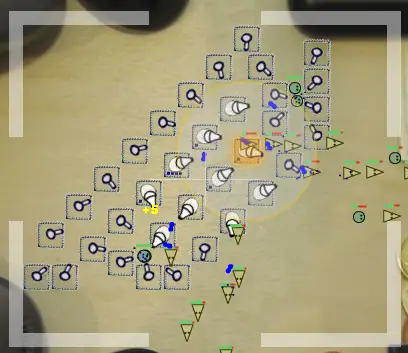
Last week we covered the Helicopter game, and this week we have another classic of the online flash games: Desktop Tower Defense.

desktop tower defense

On this strategy game your mission is to build a defense that will be able to kill all the incoming creatures, not allowing them to reach the other side of the map. You have several towers at your disposal, each with certain attributes. Not recommended if you have a lot of things to do for work today…

Filed Under: Funny Stuff

  • « Go to Previous Page
  • Page 1
  • Interim pages omitted …
  • Page 7
  • Page 8
  • Page 9
  • Page 10
  • Page 11
  • Page 12
  • Go to Next Page »

Primary Sidebar

Privacy Policy

Copyright © 2025 · News Pro On Genesis Framework · WordPress · Log in