25 Incredible Skins, Resources & Tools for the Gmail Power User
Gmail is one of those rare things unanimously loved by everyday web users and tech-heads alike. The possibilities are endless. It can be anything from a simple email client to your central nervous system on the web. How far you take it is up to you.
Each day seems to produce a new hack, tool or tip for better Gmail use. In this post, I want to highlight only the very best, hand-picked from hundreds of resources. This is not another resource list you’ll bookmark and never look at again. These tips, monster resources and tools will change the way you use Gmail.
Best Gmail skins
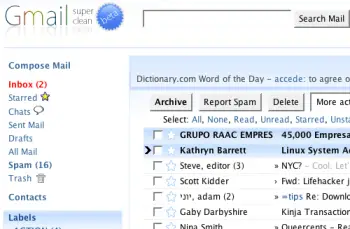
1. Super Clean skin — probably the most popular Gmail skin, Super Clean replaces the standard interface with a minimalist white and sky-blue version. Perfect for the budding Zen-master.
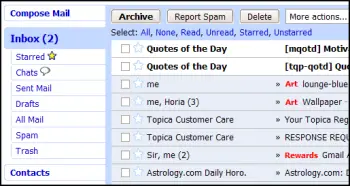
2. Air skin — makes subtle changes to the visual interface, adding clean lines, a cloudy color combo and changes the primary font. The perfect solution for users looking for a fresh look without any radical changes.
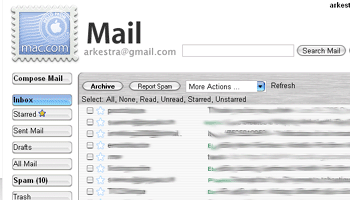
3. Mac skin — a Mac-inspired Gmail skin to match the Mac you’re checking your mail on! Adds a Mac-style menu and color-scheme to your Gmail account.
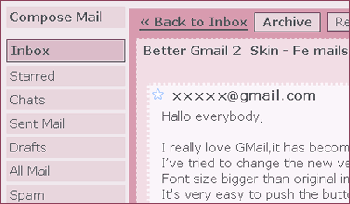
4. Fe Mail skin — a well-crafted and very pink Gmail skin.
5. Dark Gmail skin — almost the complete opposite to the last link, this skin is one for the dark and brooding Gmail user.

6. Silverstar skin — a popular minimalist gray theme.

7. Brushed skin — a gray and maroon theme with nifty gradients thrown into the mix.

Best Gmail resources
8. The Gmail Shortcuts Cheat Sheet — a comprehensive printable cheat sheet of useful shortcuts for Gmail. Print it and stick it to your desk: these shortcuts are worth memorizing. Did you know pressing ‘Tab’ and ‘Enter’ will send the email you’ve composed?
9. Gmail Craze: 40+ Tools and Hacks for Gmail — a frequently updated post from MakeUseOf featuring essential Firefox extensions, Greasemonkey Scripts, Desktop Apps, Web Tools, tips and hacks.
10. 55 Gmail tips — this website is dedicated to providing detailed Gmail tips. It covers everything from excluding chat from search results to importing Hotmail contacts.
11. Hack Attack: Become a Gmail Master — this fantastic guide from Lifehacker introduces Gmail’s most powerful capabilities in a way that’s easy to follow. It will help take anyone only familiar with Gmail’s basic functions to the next level.
12. Use Gmail as Your Universal Email Account — got too many email addresses to keep track of? Forward them all to Gmail and deal with your incoming mail from one central location.
13. Ultimate Gmail Collection: Over 80 Tools and Tips — a monster list of extensions, scripts, apps, notifiers, how-tos and shortcuts for the serious Gmail user.
14. Turn Gmail Into Your Personal Nerve Center — influential technology blogger Steve Rubel shares his essential Gmail life hacks, including:
- How to turn Gmail into a massive personal database
- How to get real-time news updates in Gmail
- How to automatically store your bookmarks in Gmail
- How to manage Calendar and To-Dos in Gmail
- How to blog from Gmail
15. 1 Awesome Gmail Tip You Didn’t Know About. Seriously. — this easy tutorial explains how you can customize your Gmail address to serve different purposes.
16. Gmail Toolbox: 60+ Tools for Gmail — Mashable.com works its magic with a huge compendium of Gmail tools. It includes all the extensions you know and love in addition to some (previously) undiscovered gems.
17. Access Gmail When It’s Blocked at Work or School — Engtech provides five strategies you can use to check your Gmail anywhere, even when the I.T. department doesn’t want you to.
18. Mark Spam Messages as Read — this simple filters hack allows you to prevent your unread spam count showing in the main display. Best of all, it will still alert you to items that have been incorrectly marked as spam.
19. Gmail Tips and Tricks: Monster Roundup — Lifehacker’s big roundup of its favorite Gmail downloads, hacks and articles.
Best Gmail tools
20. Gmail Drive — this tool puts Gmail’s extensive storage capacity to use, adding a new drive to your computer which can be accessed via Windows Explorer. You can create folders and drag and drop files within the drive. If you’ve got unused space in your Gmail account, why not add some more space to your hard drive?
21. GTD Inbox — the email solution for productivity nuts, GTD Inbox is a Firefox extension designed to merge the “Getting Things Done” productivity method with Gmail. It transforms Gmail into a productivity hub you can use to set and manage tasks or to-dos. The interface is very subtle and won’t interrupt the look and feel of Gmail as you know it.
22. Better Gmail 2 — this simple and elegant Firefox extension, authored by Gina Trapani, makes several improvements to Gmail’s core functionality, allowing you to hide the ever-annoying Spam count, compose Mailto links in Gmail and view your storage quota as a useful graph. If you’re still using the old version of Gmail, you’ll need to download the original Better Gmail extension.
23. Gmail Music — this nifty little web-based GUI app allows you to store MP3 files in your Gmail account and play them on any computer.
24. Dragdropupload — a Firefox extension that does away with the pesky ‘Browse’ interface. It enables drag and drop email attachments to make the process quick and painless.
25. Gmail Skins — a Firefox extension to customize the color of your Gmail inbox.
Suggest your favorite skins, resources and tools in the comments section!

Subscribe to our RSS Feed


also add a gmail notifier for google apps http://gmailnotifier.net
I didn’t know that we can do so much to our Gmail account.
Fantastic!
This is a great compilation of tools and stuff. gtdinbox is down though. That is the one thing I would be interested on.
Awesome list man. The skin collection is so cool
You are aware that the skins under 1. and 2. don’t work with the new Gmail version?
Jeton, I think it is a matter of time before someone make them compatible.
Pingback: 25 utilidades para mejorar gMail | aNieto2K
Pingback: Mejorar GMail
Pingback: 25 Sking für G-Mail » Beitrag » Freeware-Blog
Pingback: diarioTHC | 25 skins, recursos y herramientas para Gmail
I understand this is all focusing on the free version of Gmail, but I would love if breakdowns like this included information about which scripts/themes/etc were Google Apps compatible (since it is slightly different/lags a bit behind free Gmail).
Otherwise, useful stuff!
Pingback: 25 Incredible Skins and Tools for the Gmail Power User on El Blog Geek
Pingback: 25 Incredible Skins, Resources & Tools for the Gmail Power User - Nerdcore
Pingback: FiD WeBlog™ » Blog Archive » 25 Incredible Skins and Tools for the Gmail Power User
Pingback: Tips for Google Mail (gmail) users : Rumors
Pingback: Gmail Addons
Excellent! Will this list be regularly updated?
Chitika, we will try to keep it updated as we track new tools and resources.
Pingback: Pimp your Gmail with 25 Greasemonkey skins
These skins are awesome – thanks for the info
Nice list but…..Seems like this is a tad out of date e.g. gmail drive hasn’t worked for yonks, Cheers
Pingback: Skins, Recursos y Herramientas Para Gmail
Pingback: GMail Transformation Pack | Bitperbit
Pingback: Floppy Links: 6th February 2008 « Monscooch
Pingback: Enhancing Instruction Through Technology » links for 2008-02-06
Pingback: Skins & Tools for Gmail Power Users - WickedFire - Affiliate Marketing Forum - Internet Marketing Webmaster SEO Forum
Pingback: links for 2008-02-07 « Mandarine
Pingback: :: Eliax Blog - Para Mentes Curiosas... ::
Gmail is the best web-based email client ever, for realz.
Pingback: JabberWocky! » Good News for Google Lovers!
@Oscar – The current release of GTDInbox does not work GMail 2.0, but it does still work OK with the older version.
You can expect an updated release with loads of excellent new features *very soon* – I’ve been helping beta test it and its a huge improvement.
@Deano – GTDInbox 2.0 will work with Google Apps.
Nice find.I didn’t know some of them.I will have a try
Pingback: Deliggit.com | The social sites' most interesting urls
Pingback: iLibrarian » 25 Gmail Skins, Tools, and Resources
Pretty decent list gonna have to try some of these out, thanks.
Pingback: Juanu E-nformal » Archive » 25 formas de mejorar tu Gmail
Pingback: Mejora tu GMail: Skins, Recursos y herramientas at ZyruS WeB
Pingback: Gmail power tips « 0ddn1x: tricks with *nix
Pingback: links for 2008-02-07 « Herz statt Kommerz
Pingback: K1 | Web · Resources · Networks » Blog Archive » My del.icio.us bookmarks February 7th
Pingback: Asides | TechZilo
Pingback: Its Geek Day Every Day! » Blog Archive » 25 Incredible Skins and Tools for the Gmail Power User
Pingback: en iyi gmail temalar? ve araçlar?| Tasar?m Her?eydir…| Grafikerdem.Net
Pingback: Issuu PDF Reader - GMail Power Tools - Ask+Digg=Big News - Free Line Report 2.8.08
Pingback: Calle Serpis » 25 utilidades, temas y aplicaciones para GMail.
Pingback: Skins para Gmail | Bloggarte
Pingback: 25 Incredible Skins and Tools for the Gmail Power User » Better Than Therapy - by Mark O’Neill
Pingback: tech.twomadgeeks.com » Resources & Tools For Gmail
Pingback: 25 skins, ressources et outils pour améliorer et personnaliser son compte Gmail
Pingback: Art25 Blog » 25 Incredible Skins and Tools for the Gmail Power User
Pingback: Two Hours At Google Reader « Grazing Portal
Really incredible. But i don’t know how to install tihs skins?
Pingback: Los mejores skins, recursos y trucos para GMail « Apple Weblog Perú
Pingback: Skins, Recursos y Herramientas Para Gmail « High-Definition
Yea I didn’t even know you can do all this…nice now i can make some changes, awesome pot and stumbled =)
Pingback: Blogs para dar y tomar | El blog libre
Best skins way for me. Thank you
Pingback: links for 2008-02-13 | Moewes.com
Pingback: Lunch Time Links for 2-14-08 | Smart Pastor
Nice!
Pingback: 25 Incredible Skins, Resources & Tools for the Gmail Power User
Pingback: Varias herramientas, skins y recursos para GMail
Pingback: Cupcupcup’s Weblog
good job but some of those skins dont work anymore
Pingback: Grazing Press= » Blog Archive » Two Hours At Google Reader
Pingback: Liven up your Gmail « Just Visiting this Planet
Pingback: Most Popular Articles February 2008
Pingback: Gmail Tools and Resources | Jonathan Wilbur
Pingback: Metropolis
Pingback: Ahmet KAPLAN’?n Karalamalar? » Gmail Temalar? ve Araçlar?
Unfortunately the Mac skin does not work with Gmail 2.
Pingback: Gmail Yeniden Tasarland? ??te Yeni Gmail Temas? »
Pingback: Gmail Yeniden Tasarland? ??te Yeni Gmail Temas? - Desstek.com
Pingback: links for 2008-04-12 « D(i)PE’s weblog
Excellent! Will this list be regularly updated?
thank’s
Pingback: Daniel Scocco, Blogger, Interviews, Bloggingtips, Daily Writing Tips, Daily Bits, Daily Blog Tips
Pingback: Ed Tech Crew » Ed Tech Crew 54 - Knowledgebank, Russell’s links and E3
Pingback: Educational Technology and Life » Blog Archive »
Pingback: Exprími Gmail: recursos y skins | Sicrono
Pingback: pligg.com
Pingback: Silenceway
Pingback: 25 Incredible Skins and Tools for the Gmail Power User « Tool Boxes
thanks!
Well, this very nice and wonderful.
this is very very goog a web site
Pingback: Become an Expert with Google Gmail Via These Excellent Resources - Make Money Online with Barbara Ling, Virtual Coach
good job but some of those skins dont work anymore
Pingback: | Andrew Campbell
Pingback: Gmail – astuces | Raoul Burdet Online
I ACTUALLY appeared to be pretty pleased to discover this particular web-site.I wanted to thank you for your precious time with this amazing read!! I ACTUALLY absolutely loving every single little it and I’ve you book marked to see latest information you text.
Pingback: El correo Gmail | GeekSP